5. Automation Styles
5.1 Introduction
An automation style is a standardized methodology for creating and implementing control system modules across your facility or project. Think of it as your “playbook” for how automation systems should be structured, programmed, and deployed to ensure consistency. Multiple approaches or techniques can work together to form a complete automation style.
Definition: Implementation modules are the individual software components or function blocks that handle specific control tasks (like PID loops, motor control, or safety interlocks).
There may be several different approaches that work together to create a comprehensive automation style. For effective project execution and long-term maintainability, two primary automation styles are recommended:
Note: Choosing and sticking to a consistent automation style helps reduce programming errors, speeds up commissioning, and makes troubleshooting much easier when you’re called in at 2 AM to fix a production issue.
State-based control is a control methodology where the system’s behavior is determined by its current process state and the inputs it receives. In this approach, the controller maintains knowledge of which operational process state the system is in and makes control decisions based on that process state information.
Definition: A process state represents a specific condition or mode of operation that the system can be in at any given time. The system can only be in one process state at a time, and transitions between process states occur based on predefined conditions or events.
The controller uses a state machine (a logical structure that defines all possible process states and transitions) to manage system behavior. Each process state typically has associated actions or outputs, and the transitions between process states are triggered by specific input conditions, timer events, or external signals.
Industrial Example: A pump control system might have states like “Stopped,” “Starting,” “Running,” and “Fault.” The controller transitions from “Stopped” to “Starting” when a start command is received, then to “Running” once proper pressure is achieved, and to “Fault” if abnormal conditions are detected.
State-based control is particularly effective for systems with distinct operating modes or sequential operations. It provides clear logic flow, makes troubleshooting easier (since you can identify exactly which state caused an issue), and allows for complex decision-making based on system conditions.
Note: This approach differs from continuous control methods like PID, where outputs are calculated based on continuous error signals rather than discrete operational states.
Sequence-based control is a programming approach where industrial processes are controlled through a series of predefined steps that execute in a specific order. Unlike continuous control loops (such as PID controllers that constantly adjust outputs), sequence-based control moves through discrete stages based on predetermined conditions being met.
Definition: Each step in the sequence typically waits for specific input conditions (like sensor feedback, timer completion, or operator commands) before advancing to the next step. This makes it ideal for batch processes, startup/shutdown procedures, and any application requiring a methodical progression through operational phases.
Industrial Example: Consider an automated filling station where the sequence might include: 1) Position container, 2) Open fill valve, 3) Monitor level sensor, 4) Close valve when full, 5) Move container to next station. Each step must complete successfully before the next begins.
The control logic is often implemented using ladder logic, structured text, or sequential function charts (SFCs) in programmable logic controllers (PLCs). SFCs are particularly well-suited for this application as they provide a visual representation of the process flow with clear transitions between steps.
Note: Sequence-based systems typically include safety interlocks and fault handling routines that can pause, restart, or abort the sequence if abnormal conditions are detected. This differs from continuous control where the system constantly responds to setpoint changes and disturbances.
Common applications include material handling systems, chemical batch reactors, packaging machinery, and any process requiring coordinated movement of multiple actuators in a predetermined order.
These two automation styles share many similarities but differ in their practical implementation approaches. When choosing between them, control engineers should follow their company’s established automation philosophy and selection procedures, which typically outline criteria such as system complexity, maintenance requirements, and integration capabilities.
Note: The automation philosophy document usually defines standards for PLC programming styles, HMI design approaches, and communication protocols that ensure consistency across plant operations and simplify long-term maintenance.
The automation style selection should be based on several key factors that control engineers need to evaluate: company philosophy regarding automation levels, the engineering team’s knowledge and experience with implementing specific automation technologies, and the operators’ familiarity with effective HMI (Human-Machine Interface) design and dynamic alarm management systems.
Note: Dynamic alarm management refers to systems that automatically adjust alarm priorities and suppress nuisance alarms based on current plant conditions, helping operators focus on critical issues.
When selecting an automation approach, consider how well your team understands the implementation requirements and whether your operators are comfortable with the level of system interaction and situational awareness the chosen style will require. There are two important definitions that provide the foundation for this selection process (see Chapter 3):
- State: A pre-defined state of a module such as (Block Valve Open, Close), (PID Manual, Auto, Cascade), and (Pump Run, Stop).
- Step: A set of actions in which the behavior of a procedure implementation module follows a set of rules with respect to its inputs and outputs.
The development of an automated procedure for a process with several Boolean and Analog devices should be defined based on:
When designing automation sequences for industrial processes that include both Boolean devices (digital on/off components like solenoid valves, motor, and limit switches) and Analog devices (continuous signal components such as temperature transmitters, flow meters, and control valves), the procedure development must consider several key factors.
Definition: Boolean devices operate in discrete states (typically 0/1 or ON/OFF), while analog devices handle continuous variables that can take any value within a specified range (like 4-20 mA or 0-10V signals).
Industrial Example: In a typical batch mixing process, Boolean devices might include pump start/stop commands and valve open/close positions, while analog devices would handle temperature setpoints, flow rate measurements, and variable speed drive outputs.
Note: The integration of both device types requires careful consideration of timing relationships, as Boolean operations are instantaneous while analog operations often involve ramp rates and settling times that affect overall sequence timing.
- Piping and Instrument Diagram (P&ID): The Plant P&ID is used to define the Physical Model.
- Standard Operating Procedure (SOP): The SOP provides the required actions for each device in time from start-up to run to shut-down to be executed by the operator.
The development of procedural automation is built on automating at least the following core elements:
Definition: Procedural automation refers to the systematic control of sequential operations or batch processes, where specific steps must be executed in a predetermined order with defined conditions and interlocks.
When implementing procedural automation systems, control engineers must ensure that the automated sequence can handle the fundamental building blocks of any industrial process. These typically include valve operations (open/close sequences), pump starts and stops, temperature and pressure setpoint changes, and safety interlocks that prevent unsafe operating conditions.
Note: This foundational approach ensures that complex multi-step processes can be broken down into manageable, repeatable automated procedures that maintain process safety and consistency while reducing operator workload.
- Boolean devices: Change the state of Boolean devices such as block valves, motors, and pumps from one state to another state such as from OFF to ON and vice versa.
- Analog devices: Change the state of Analog Devices such as the control valves, and PID controllers from their current state (sometimes referred to as mode) to Manual, Automatic, or Cascade and vice versa. In Analog devices, their attributes such as setpoints, Gain, and Alarm Limits can be set by automation procedures as well.
After developing the Physical Model from the P&ID (Piping and Instrumentation Diagram - the engineering drawing that shows process equipment and instrumentation), the next step is creating the procedural model for each selected Physical Model. The SOP (Standard Operating Procedure) for a selected Physical Model can be broken down into the following categories:
Note: The procedural model defines the step-by-step control sequences and operating logic that govern how the physical equipment actually operates in practice. This bridges the gap between the static P&ID representation and the dynamic control system implementation.
- Collection of related actions (change of device state) and verification in time.
- Such as starting to fill a tank.
- The collection of actions (device state changes) needs to be automated and verified. For example, in the filling state of the process, only the inlet-related devices are to be turned ON. In this standard, management of the selected device’s states is achieved in a programming container called step. For example, the step labelled Fill will contain all actions to open all related devices needed to achieve this task. When this step is active all its actions (change of state) will be executed.
- Wait for the execution of the actions in the active step to produce the required change in the state of the process.
- Such as checking if the tank is filled
- A programming logic called Transition is used to check the filling State of the process is accomplished.
- For example, the Fill to Heat transition with its logic defined as
- (Level > 75% for 1 minute and Fill Step is active) == True
- Transition to the new collection of related actions and verifications.
- Based on the above transition becoming True, the active step of the process moves to Heat. In this step, the state of predefined devices in this step will be changed by procedural automation (such as the opening steam valve and setting its PID controller to automatic with its desired setpoint).
These definitions work for both State-Based Control and Sequence-Based Control approaches in automation systems. It’s important to understand that when we talk about “steps,” we’re describing how the control logic is programmed and structured in our code. On the other hand, when we refer to “states,” we’re talking about the actual physical condition or status of the equipment or process we’re controlling (this is what we call the Physical Model - the real-world representation of our system).
Note: Think of steps as the instructions you write in your PLC program, while states represent what’s actually happening on the plant floor with your motors, valves, and sensors.
The procedural steps and their state transitions (changes from one operating condition to another) must be clearly displayed to plant operations, particularly the control room operator. This visualization gives the operator real-time institutional awareness - a complete understanding of where the process currently stands and how it’s progressing.
Key Benefit: Rather than requiring the operator to manually adjust each digital input/output (Boolean devices like valves, pumps) and analog control loops (like flow controllers, temperature setpoints) according to the Standard Operating Procedure (SOP), the automated procedure handles these device state changes automatically.
Industrial Example: Instead of an operator manually opening 15 valves, starting 3 pumps, and adjusting 5 flow setpoints in sequence during a startup procedure, the automated system executes these changes in the correct order while the operator monitors progress on the HMI (Human Machine Interface).
This automation reduces the potential for human error while ensuring consistent execution of complex multi-step procedures, though the operator maintains supervisory control and can intervene when necessary.
The term “state” in State-Based Control refers to automating based on the current condition or status of a device (such as “running,” “stopped,” or “fault”). In contrast, Sequence-Based Control gets its name from automating a predefined series of operations that follow the steps outlined in a Standard Operating Procedure (SOP).
Note: State-Based Control responds to what the equipment is doing right now, while Sequence-Based Control follows a predetermined recipe or procedure regardless of timing.
The following control system styles are addressed in this standard:
Note: These styles refer to different architectural approaches for implementing process control systems, each with specific characteristics for signal processing, operator interfaces, and system integration methods that control engineers should understand when designing or maintaining industrial automation systems.
- State-Based Control (SBC) – SBC applies the concept of process states as a framework for organizing procedural automation. Process state is used to organize and direct alarming, device status, and operator actions. The simplification of the unambiguous step reinforces the operator’s mental models. SBC’s definition includes step-to-step interactions (mode of operation) as part of the design.
- Sequence-Based Control (SqBC) – SqBC applies the sequenced actions and verifiications from the operating procedure as a framework for organizing procedural automation. Sequence-based control tends to organize the procedural automation in a manner that follows plant operating procedures. Within a single implementation module, steps may be run parallel.
- Finite-State Machine (FSM) – This is a special implementation of State-Based Control used as a “BlackBox” approach to coordinate and automate multiple interactive devices or equipment producing a common process activity, such as compressors automation or process skid.
5.2 Style of Automation Definitions
The following automation styles are defined for implementation in control systems:
- State-Based Control
- Sequence Based Control
- Finite-State Machine
5.2.1 State-Based Control (SBC)
State-Based Control defines automation behavior using process states that represent operating conditions of equipment or units.
5.2.1.1 Core Idea
The process is always in a defined process states (Ready, Run, Shutdown, etc.), and control logic manages transitions between those process states.
5.2.1.2 Characteristics
- States represent operating conditions
- Steps cause transition from one state to another
- Each step must change at least one state
- Transitions are condition-based
- Focus is on operating modes and state management
5.2.1.3 Typical Use
- Continuous processes
- Unit operations (furnace startup, compressor mode control)
- Systems requiring mode clarity and safety governance
5.2.2 Sequence-Based Control (SqBC)
Sequence-Based Control defines automation behavior using ordered procedural steps derived from the operating procedure (SOP).
5.2.2.1 Core Idea
The process progresses through predefined steps in sequence, and when transition conditions are satisfied, it moves to the next step.
5.2.2.2 Characteristics
- Steps derived directly from SOP
- Steps can be Active or Inactive
- Transitions trigger movement to next step
- Multiple steps can be active simultaneously
- Focus is on procedural execution
5.2.2.3 Typical Use
- Batch processes
- Coordinated operations (fill + heat simultaneously)
- Operator-guided startup sections
5.2.3 SBC vs SqBC — Direct Comparison
| Aspect | State-Based Control (SBC) | Sequence-Based Control (SqBC) |
|---|---|---|
| Primary Driver | Process States | Procedural Steps |
| Core Structure | State Model | Step / Transition Model |
| Philosophy | Mode control | Procedure execution |
| Step Purpose | Cause state change | Execute procedural logic |
| Simultaneous Actions | Managed via states | Natural and common |
| Best For | Continuous processes | Batch processes |
| Operator View | “What state is the unit in?” | “What step are we in?” |
| Governance | Strong state clarity | Strong procedural clarity |
Note: These automation styles represent different approaches to system control, ranging from basic manual operations to fully autonomous systems. Understanding which style applies to your process helps determine the appropriate control architecture, operator interface requirements, and safety systems needed for your application.
Definition: Automation style refers to the level of automatic control versus manual operator intervention required in a process or system operation.
A step input is a fundamental test signal used in control system analysis where the input instantly changes from one constant value to another (typically from 0 to 1) and remains at that new value. This abrupt change allows control engineers to evaluate how quickly and accurately a system responds to sudden command changes.
Definition: The mathematical representation of a unit step is u(t) = 0 for t < 0 and u(t) = 1 for t ≥ 0.
When analyzing step responses, we examine key performance characteristics including rise time (how quickly the output reaches the target), settling time (when the output stabilizes within acceptable limits), overshoot (how much the response exceeds the setpoint), and steady-state error (the final difference between desired and actual output).
Industrial Example: In a temperature control system, applying a step input would be like instantly changing the setpoint from 20°C to 50°C and observing how the system responds.
Note: Step response testing is particularly valuable because it reveals system stability, speed, and accuracy in one simple test, making it essential for tuning PID controllers and validating system performance.
A step transition refers to an instantaneous change in the setpoint or reference signal of a control system. This creates a sudden jump from one steady-state value to another, appearing as a sharp vertical line when plotted against time.
Definition: The step input is one of the fundamental test signals used in control system analysis, mathematically represented as a unit step function that changes from 0 to 1 (or any initial value to final value) at time t = 0.
Step transitions are commonly encountered in industrial applications when operators manually change setpoints or when automated sequences trigger new operating conditions. The system’s response to this abrupt change reveals critical performance characteristics including settling time (how long it takes to reach the new setpoint), overshoot (how much the output exceeds the target), and steady-state error (the final difference between desired and actual values).
Industrial Example: When a temperature controller setpoint is changed from 150°C to 200°C, the resulting step response shows how quickly and accurately the heating system can achieve the new target temperature.
Control engineers use step response analysis to tune PID controllers, validate system models, and assess overall loop performance. The shape of the step response curve directly indicates whether the system is underdamped (oscillatory), overdamped (sluggish), or critically damped (optimal response without oscillation).
Step commands are fundamental test inputs used to evaluate control system performance and stability. A step command represents an instantaneous change from one setpoint value to another, creating a square wave profile when plotted over time.
Definition: A step input mathematically represents a sudden change in the reference signal, typically from zero to a constant value, allowing engineers to analyze how quickly and accurately the system reaches the new target.
When implementing step commands in practice, the control system’s response reveals critical performance characteristics. The rise time indicates how quickly the system initially responds, while settling time shows how long it takes to reach and maintain the final value within acceptable tolerance bands (typically ±2% or ±5% of the final value). Overshoot percentage demonstrates whether the system exceeds the target before settling, which can indicate aggressive tuning or insufficient damping.
Industrial Example: In a temperature control system, applying a step command from 20°C to 80°C allows you to observe whether the heater responds appropriately, how long it takes to reach 80°C, and if the temperature overshoots before stabilizing.
Step response testing is particularly valuable because it simulates real-world disturbances and setpoint changes that occur during normal operation. The resulting data helps determine if controller parameters (proportional gain, integral time, derivative time) need adjustment to meet performance specifications.
Note: While step inputs provide excellent diagnostic information, implement them gradually during commissioning to avoid mechanical stress or process upsets in sensitive systems.
Digital control systems can generate perfect step commands programmatically, while analog systems may show slight rounding due to bandwidth limitations in the signal conditioning circuits.
Sequential Function Chart (SFC) is a graphical programming language defined in the IEC 61131-3 standard that provides a structured approach to programming sequential control logic. As a programming method, SFC breaks down complex automation processes into discrete steps and transitions, making it particularly well-suited for batch processes, state machines, and any application where operations must occur in a specific order.
The fundamental structure of an SFC consists of steps (represented as rectangular boxes) and transitions (shown as horizontal lines across vertical connection lines). Each step represents a stable state in the process where specific actions occur, while transitions define the conditions that must be met to move from one step to the next. Steps contain actions that can be written in any of the other IEC 61131-3 languages (Ladder Logic, Function Block Diagram, Structured Text, or Instruction List), providing flexibility in how you implement the actual control logic.
Key Components:
Steps - Active states where control actions are executed. Only one step in a sequence can be active at a time, and each step has an associated action block that defines what happens when that step is active.
Transitions - Boolean conditions that determine when the program moves from one step to another. A transition must evaluate to TRUE for the program to advance, and transitions are evaluated continuously while the preceding step is active.
Actions - The control logic associated with each step, which can include setting outputs, calling function blocks, or executing complex algorithms written in other programming languages.
Industrial Example: In a paint mixing system, Step 1 might be “Fill Tank A with Base Paint” with actions to open valve V1 and start pump P1. The transition to Step 2 could be “Level Switch LS1 = TRUE AND Timer T1 > 30 seconds,” ensuring both adequate fill level and minimum fill time before proceeding to “Add Pigment.”
Note: SFC execution follows strict rules - when a transition condition becomes true, the current step deactivates, its actions stop executing, and the next step becomes active. This provides deterministic behavior that’s crucial for safe industrial automation.
The language also supports parallel branches (simultaneous sequences), selection branches (alternative paths), and jumps, allowing for sophisticated control structures that can handle complex manufacturing processes while maintaining clear, readable code that’s easier to troubleshoot than traditional ladder logic for sequential operations.
5.2.4 Step
A step is defined as a set of actions where a procedure implementation module (a software block that executes a specific control sequence) behaves according to defined rules for its inputs and outputs. The step serves as a programming container that manages the selected device’s states and implements the required actions.
Note: Think of a step as a discrete phase in your control sequence - for example, in a pump startup procedure, one step might handle valve positioning while another manages motor acceleration. Each step has clear entry conditions, execution logic, and exit criteria that determine when to move to the next step in the sequence.
- A step is a set of actions in which the behavior of a procedure implementation module should follow a set of rules with respect to its inputs and outputs.
- State-Based Control or Sequence-Based Control may be implemented at each level of the procedural implementation model (Except the Control implementation Module) by defining the steps and their movement from one step to another as a step transition within that module.
- Each Implementation Module (such as EM, UM, or higher) will have its steps and step transition defined. A Control Implementation Module (CM) should not have steps or step transitions.
- The step should contain:
- Step Name: A unique name representing the step (Wait, Run, Fill).
- Step Status: It may be represented by the logic value of a Boolean. This Boolean variable has the value 1 when the corresponding step is active, and 0 when it is inactive.
- Step Command(s): These are commands that the step may send to subordinate modules (Open Valve, Change PID Mode from manual to auto, or start a pump)
- The status of a step may include:
- Active step: A step is activated when another step is active and the connecting step transition from the currently active step to this step becomes TRUE. An active step becomes inactive once the step transition to another connecting step becomes TRUE.
- Inactive or Idle step: The step is NOT activated.
- Per company procedure automation philosophy and selected control system, other conditions (such as hold, pause, jump, skipped).
- The following are defined for the steps
- In State-Based Control, within an implementation module, only one step shall be active at any time.
- Each step should be connected to its originating step with a step transition.
- Each step should be connected to its destination step with a step transition.
- Per company philosophy, abnormal situations may be addressed.
- When a step becomes active, a set of predefined step commands are executed. Once a Step is active, a set of predefined step commands may be executed. Example commands include “open valve” or “energize solenoid”. Commands may also control timing, such as “wait 10 seconds” or “ramp valve at 5%/min to 100%”. The timing and duration of the commands can be specified, for example, see the annex for Model Drawing Philosophy.
- P0: Runs once on step deactivated (Falling Edge)
- P1: Runs once on step activation (Rising Edge)
- P: Runs once on step activation and again on deactivation (P1+P0)
5.2.5 Step Transition
As defined in 3.1.65, a step transition is a condition where control passes from one predecessor step to another step along a directed link (a connection that shows the flow direction between steps in the control sequence).
Definition: In sequential control systems, this represents the moment when the system moves from its current state to the next programmed state based on specified trigger conditions.
Industrial Example: In a batch mixing process, a step transition occurs when the system moves from “Fill Tank” to “Start Mixing” once the level sensor confirms the tank is full - the filled condition triggers the transition along the programmed sequence.
Step transitions control how a system moves between different operational steps by defining both the allowable pathways and the specific conditions that must be met to trigger each transition. These transitions contain the logic or conditional statements that enable a step to change from an inactive state to an active state (essentially turning “on” a particular operation or sequence).
Key Characteristics: Step transitions are deterministic, meaning they produce the same output every time given identical input conditions, and persistent, meaning once a transition condition is met, it remains true until the system actively changes state or resets.
Industrial Example: In a conveyor system, a step transition might specify that the “loading” step can only move to the “transport” step when both the weight sensor confirms a part is present AND the upstream process signals completion.
The Step transitions define the conditions that determine when control moves from the current step to the following step in the sequence. Each step transition is built around a logical statement (or condition) that the control system evaluates as either True or False.
Definition: A logical statement is a Boolean expression that combines input signals, timers, or other system variables using operators like AND, OR, and NOT.
When the transition condition evaluates to True, the control system advances to the next step. When it evaluates to False, the system remains in the current step until the condition becomes True.
Industrial Example: In a conveyor system, a step transition might be “Part_Present AND Quality_Check_Complete” - the system only moves to the next step when both a part is detected AND the quality inspection has finished.
In State-Based Control, a step transition can only connect one step to one other step directly. This means each transition creates a one-to-one relationship between the current state and the next state in the control sequence.
Definition: A step transition is the condition or trigger that causes the control system to move from its current operational state to the next predetermined state.
Note: This one-to-one constraint ensures predictable system behavior and prevents ambiguous state changes that could lead to unsafe or unintended operations in your control logic.
- Originating Step: This is the step that immediately precedes the transition. Once the step transition condition becomes TRUE the Originating Step should become inactive.
- Destination Step: The Destination step becomes active once the step transition condition becomes TRUE.
The step transition may contain:
Definition: A step transition refers to the logical condition that must be met for a Sequential Function Chart (SFC) program to move from one step to the next step in the sequence.
Note: In control systems programming, these transitions act as gates that determine when the automation sequence should proceed. They typically evaluate input conditions, timer states, or internal logic before allowing the program to advance to execute the next set of actions.
Industrial Example: In a conveyor system, a step transition might check that “Part_Present” sensor is TRUE AND “Conveyor_Ready” status is TRUE before moving from the “Wait_for_Part” step to the “Transport_Part” step.
- Step Transition Name: A unique name representing the Step Transition (Wait_Fill, Fill_Run).
- Step Transition Condition: A logical statement evaluated as either TRUE) or FALSE. The step transition condition should always contain the “AND Step (From)” at the end of its condition although in many SFC engines this may be automatic.
5.2.6 Sequential Function Chart
As defined above, Sequential Function Chart (SFC) is a graphical programming language designed for state-based control applications, particularly useful for implementing procedure automation. SFC is one of the five standardized programming languages specified in the IEC-61131-3 standard (the international standard that defines programming languages for programmable logic controllers).
Definition: State-based control refers to systems where the control logic depends on the current operating state of the process, with transitions between states triggered by specific conditions.
Industrial Example: Common SFC applications include batch processing operations, equipment startup/shutdown sequences, and material handling systems where the process moves through distinct operational phases.
The following paragraphs provide practical recommendations for effectively using SFC in state-based control implementations.
The main components of SFC (Sequential Function Chart - a graphical programming language defined in IEC 61131-3 standard) are:
Note: SFC is particularly useful for batch processes, state machines, and any application where you need to control a sequence of operations. It’s one of the five standard PLC programming languages alongside Ladder Logic, Function Block Diagram, Structured Text, and Instruction List.
Industrial Example: Think of an automated bottling line where you need to fill, cap, label, and package bottles in a specific order - SFC helps visualize and program these sequential steps with clear transitions between each operation.
- Steps with associated commands
- Transitions with associated logic conditions
- Directed links between steps and transitions.
A step in an SFC diagram (Sequential Function Chart - a graphical programming language used for sequential control processes) should be either active or inactive at any given time. Commands and control logic should only be executed when their associated step is in the active state.
Note: This ensures proper sequential operation and prevents unintended simultaneous execution of conflicting control actions. Only one step in a sequence should typically be active unless parallel branches are intentionally designed in the SFC structure.
There should be three methods to implement SFC (Sequential Function Chart - a graphical programming language used in PLCs for sequential control processes) as shown in Figure 13:
Note: SFC is particularly useful for processes that follow a clear sequence of steps, such as batch operations, packaging lines, or startup/shutdown procedures. Each method offers different advantages depending on your system architecture and programming preferences.
- Normal
- Parallel Branching
- Alternate Branching
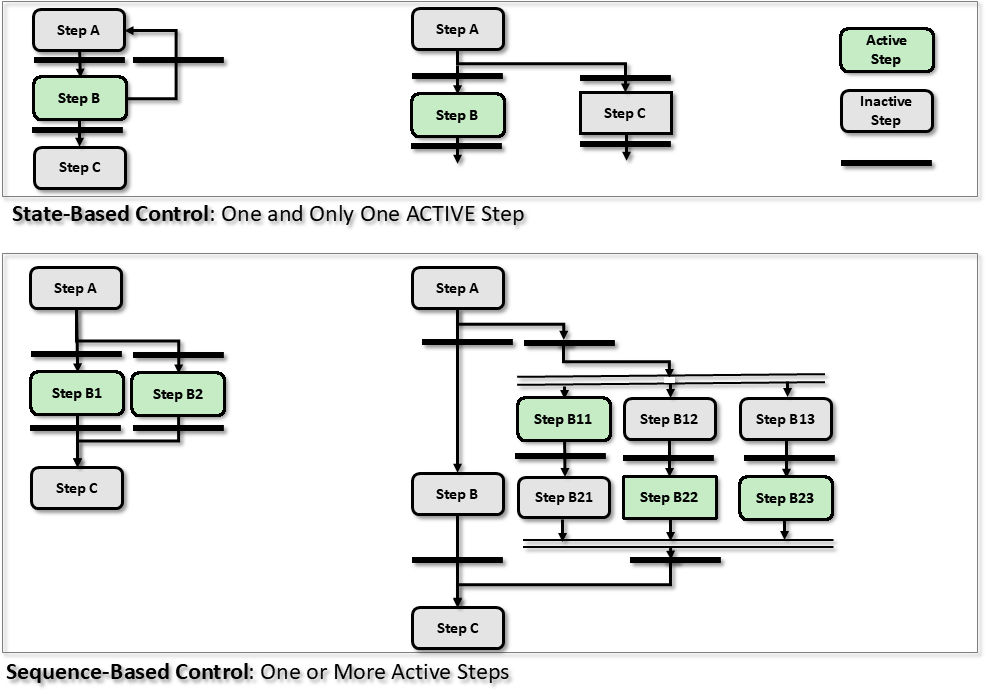 Figure 13 The three fundamental branching structure
Figure 13 illustrates the three fundamental branching structures used in Sequential Function Charts (SFCs): Normal, Alternative, and Parallel branches. These branching types determine how program execution flows between different steps in your automation sequence.
Normal Branch: Shows linear step progression where each step executes sequentially after the previous step’s transition condition is met. This is the most common structure for straightforward process control applications.
Alternative Branch: Represents conditional branching where program execution follows only one of multiple possible paths based on which transition condition becomes true first. The branch that activates depends on process conditions at runtime.
Parallel Branch: Demonstrates simultaneous execution of multiple sequence paths that run concurrently. All parallel branches must complete their respective sequences before the program can converge and continue to the next step.
Note: Understanding these branching structures is essential for designing complex automation logic, as most industrial processes require combinations of sequential, conditional, and parallel operations to achieve proper system control.
In Normal Branching, each Step must be connected to another Step through a Transition (the logic condition that determines when to move between steps), and only one step should be active at any given time.
Note: This is the fundamental rule for sequential programming - think of it like a single path where the system can only be in one state at a time, moving from one step to the next only when the transition condition is satisfied.
In Sequence-Based Control, Parallel Branching allows multiple process steps to run at the same time instead of one after another. This starts with a single step that has one transition, but this transition simultaneously activates several steps that can all run in parallel (at the same time).
Definition: Parallel branching is a control structure where the sequence splits into multiple independent paths that execute simultaneously, then rejoins into a single path.
Each parallel branch operates independently - what happens in one branch doesn’t affect the timing or execution of the other branches. However, all branches must eventually come back together through a joint transition. This joint transition (the merge point) will only allow the sequence to continue after every single parallel branch has completed its tasks. Think of it like a checkpoint where all branches must “check in” before moving forward.
Note: In standard Sequential Function Chart (SFC) notation, parallel branching is shown with double horizontal lines - one line where the sequence splits into parallel paths, and another where the branches merge back together.
When examining Sequential Function Chart (SFC) logic, steps stepC11, StepC22, and StepC23 are currently active, meaning these process stages are executing simultaneously. This condition applies only within sequence SqBC.
Note: In SFC programming, multiple steps can be active at the same time when the logic includes parallel branches or when using divergence structures. Active steps indicate which portions of the sequential process are currently running and need to complete their conditions before the sequence can advance to the next steps.
In Alternative Branching, control programs need to respond differently based on various events or conditions that occur during execution. This programming structure allows a single step to branch into multiple possible paths, where each path represents a different response to a specific condition.
Definition: Alternative branching is a control structure where one step can lead to several different subsequent steps, but only one path is taken based on the conditions present at runtime.
Each potential branch connects to its own step through a separate transition (the logic condition that must be met to move from one step to another). To prevent multiple branches from executing simultaneously, these transitions must be designed as mutually exclusive - meaning only one transition can be active at any given time. This is typically achieved through mutually locked conditions or by establishing clear priority rankings between transitions.
Note: In most PLC and control systems, when multiple transition conditions could theoretically be met simultaneously, the system evaluates them in a left-to-right sequence and enables the first transition whose conditions are satisfied.
The visual representation in Figure 13 shows this structure with a single horizontal line both entering and exiting the alternative steps, indicating that the flow converges back to a single path after the branched execution is complete. This ensures the program maintains a clear, deterministic flow despite having multiple possible execution paths.
In this Sequential Function Chart (SFC) configuration, only Step B1 is currently in the active state.
Definition: An SFC is a graphical programming language used in PLCs to represent sequential control logic as a series of steps and transitions.
Note: When a step is “active” in an SFC, it means the control logic associated with that particular step is currently executing, while all other steps remain inactive until their transition conditions are met.
Industrial Example: In a batch mixing process, if Step B1 represents “Fill Tank with Material A,” then only the valves and pumps associated with this filling operation would be running, while subsequent steps like “Add Material B” or “Start Mixing” would remain inactive until Step B1 completes and its transition condition becomes true.
5.2.7 Implementation of Step Commands
Upon activation of a step (when the step becomes active in the sequence), a pre-defined set of step commands should be performed. These commands define what actions the system will take during that particular step. There may be two methods to implement the step commands:
Note: Step commands are the specific instructions that tell your control system what to do when a step is running - such as starting a motor, opening a valve, or setting a temperature setpoint. The implementation method you choose will affect how flexible and maintainable your control logic becomes.
- Push Command: Step commands may be implemented using the action functionality provided in the SFC. An implementation module (such as a Unit Module UM) with SFC may send step commands to subordinate implementation modules (Equipment or Control Modules), such as:
When the FILLING Step is currently running (active state), the procedure will automatically execute the following sequence of step commands:
Note: In batch processing, a “step” refers to a discrete operation within the overall procedure that has defined start and end conditions. The FILLING step typically involves opening inlet valves, starting pumps, and monitoring level sensors until the target fill level is reached.
Industrial Example: During a tank filling operation, the active FILLING step might execute commands like “Open Valve V-101,” “Start Pump P-201,” and “Monitor Level Transmitter LT-301 until setpoint is reached.”
BlockValve := TRUE
This assignment statement sets the BlockValve boolean variable to TRUE, which typically commands a block valve to close or activate its blocking function. In industrial control systems, block valves are safety devices used to completely stop flow in a pipeline or process line.
Note: The “:=” operator is the assignment operator in structured text programming languages (like those used in PLCs), which differs from the “=” comparison operator used for logical evaluations.
Industrial Example: When a safety interlock is triggered, the control system might execute “BlockValve := TRUE” to immediately shut off flow to a reactor vessel, preventing potentially hazardous conditions.
LevelPIDAuto := TRUE
This assignment enables automatic mode for the level control PID loop. When set to TRUE, the PID controller (Proportional-Integral-Derivative controller that automatically adjusts output based on error between setpoint and process variable) takes control of the level regulation process without manual operator intervention.
Note: Setting this to FALSE would switch the system to manual mode, where operators must manually adjust the control output. Most level control applications run in automatic mode during normal operation to maintain consistent performance and reduce operator workload.
Industrial Example: In a water treatment tank, when LevelPIDAuto is TRUE, the PID controller automatically opens or closes inlet valves to maintain the desired water level setpoint, responding to disturbances like varying outflow rates.
LevelPID.SP:= 75
This line of code sets the setpoint (SP) for a level control PID loop to 75. The setpoint is the desired target value that the PID controller will try to maintain - in this case, the system will attempt to keep the liquid level at 75 units (typically inches, centimeters, or percentage of tank capacity, depending on your transmitter scaling).
Note: The “:=” operator is structured text assignment syntax commonly used in PLCs like Allen-Bradley ControlLogix or Siemens TIA Portal. This directly writes the value 75 to the setpoint parameter of your level PID instruction block.
Industrial Example: If you’re controlling water level in a boiler feedwater tank scaled 0-100%, this command tells the PID to maintain the level at 75% of tank capacity.
When the RUNNING Step is active (meaning the control sequence is currently executing), the procedure will automatically execute the following step commands in sequence:
Note: The RUNNING Step indicates that the system has moved beyond initialization and is now actively processing the programmed control logic. During this phase, each step command executes based on the defined conditions and timing parameters you’ve configured in your control program.
BlockValve:= TRUE
This assignment statement sets the BlockValve boolean variable to TRUE, which typically signals that a valve should be in the closed or blocking position. In PLC programming (Programmable Logic Controller), the “:=” operator performs variable assignment, storing the TRUE value in the BlockValve memory location.
Note: The TRUE state usually indicates an active or “energized” condition. Depending on your system’s logic design, this could mean either opening or closing the physical valve - always verify the intended behavior by checking your I/O configuration and safety interlocks.
Industrial Example: In a pipeline safety system, setting BlockValve:= TRUE might activate a solenoid valve to stop fluid flow during an emergency shutdown sequence.
LevelPIDAuto:= TRUE
This Boolean variable assignment enables automatic mode for the level control PID loop. When set to TRUE, the PID controller (a feedback control algorithm that uses Proportional, Integral, and Derivative terms) takes over process control without manual operator intervention.
Note: In automatic mode, the PID controller continuously calculates control output based on the difference between the desired setpoint and actual measured level. This contrasts with manual mode, where an operator would directly adjust the control output.
Industrial Example: In a water treatment tank, setting LevelPIDAuto to TRUE allows the PID controller to automatically adjust valve positions or pump speeds to maintain the desired water level, rather than requiring an operator to manually control these actuators.
The TRUE assignment is typically triggered by operator selection from an HMI (Human Machine Interface) or through programmed logic conditions that determine when automatic control is appropriate and safe.
LevelPID.SP := 75
This line sets the setpoint (SP) for the level PID controller to 75. The setpoint is the desired target value that the controller will attempt to maintain - in this case, the system will work to keep the liquid level at 75 units (typically inches, centimeters, or percentage of full scale, depending on your transmitter scaling).
Note: The “:=” operator is structured text assignment syntax used in IEC 61131-3 programming languages like those found in most PLCs. This directly writes the value 75 to the setpoint parameter of your PID function block named “LevelPID”.
Practical Consideration: Always verify that your setpoint value falls within the safe operating range of your vessel and matches the engineering units configured in your level transmitter and PID block scaling parameters.
- Pull Command (Enable Logic): The procedural module (UM, EM, or higher) or a sequential code may pull step information (Active Step) and use it in a code labelled Enable Logic to implement the step command. Actions may be implanted in the code provided in the subordinate module. With “pull command”, each subordinate module may have associated code. This code may pull step and step status information. The module should use this information to run the appropriate step command.
Example 1: This instruction is located in the subordinate implementation module (a lower-level software module that handles specific control functions and reports to a higher-level supervisory module):
Note: In industrial control systems, the subordinate module typically executes the actual control logic while the main module coordinates overall system operation. Think of it as the relationship between a local PID controller and a supervisory SCADA system.
If the system is in FILLING mode (actively adding material to the process vessel) or RUNNING mode (normal production operation is active) then
Note: These are discrete states that represent different phases of the batch process operation. FILLING typically indicates valves are open and material is being transferred, while RUNNING means the main process sequence is executing.
BlockValve := TRUE
This is a Boolean variable assignment that sets the BlockValve to an active state. In industrial control systems, block valves are typically used to isolate process sections or equipment for safety, maintenance, or operational control.
Note: The “:=” operator is the standard assignment operator in IEC 61131-3 programming languages (like Structured Text), which differs from the “=” operator used in some other programming languages.
Industrial Example: Setting BlockValve to TRUE might command a motorized isolation valve to close, stopping flow in a pipeline section before maintenance work begins. The actual valve position feedback should be monitored separately through limit switches or position sensors to confirm the valve has reached its intended state.
Safety Consideration: Always verify that setting a block valve won’t create unsafe pressure conditions or interrupt critical process flows before executing this command.
LevelPIDAuto:= TRUE
This assignment statement enables automatic mode for the level PID controller. When set to TRUE, the PID controller (Proportional-Integral-Derivative controller that automatically adjusts output based on the difference between setpoint and measured value) will operate autonomously without manual operator intervention.
Note: In automatic mode, the controller continuously calculates control actions based on the PID algorithm parameters. Setting this to FALSE would switch the controller to manual mode, where operators must manually adjust the output.
Industrial Example: In a water tank level control system, when LevelPIDAuto is TRUE, the controller automatically opens or closes valves to maintain the desired water level. The operator only needs to set the target level setpoint.
LevelPID.SP:= 75
This line sets the setpoint (SP) for a level control PID loop to 75. The setpoint is the target value that you want your process variable to maintain - in this case, the desired liquid level in your tank or vessel.
Note: The “:=” syntax is structured text (ST) programming language assignment, commonly used in PLCs like Siemens TIA Portal or Beckhoff TwinCAT. This differs from simple “=” which is typically used for comparisons.
Industrial Example: If this is a water tank level controller where 75 represents 75% of full scale (or 75 inches, depending on your engineering units), the PID controller will now work to maintain the tank at this level by adjusting the control output - typically a valve position or pump speed.
End if is a programming statement that closes or terminates an if-then conditional block in control system logic. This statement marks the conclusion of conditional execution paths in ladder logic, structured text, or other programming languages used in PLCs (Programmable Logic Controllers) and DCS (Distributed Control Systems).
Definition: The “End if” statement pairs with an opening “If” statement to define the boundaries of conditional code execution - essentially telling the controller where the conditional logic stops.
Industrial Example: In a temperature control application, you might write:
If Temperature > Setpoint Then
    Turn On Cooling Valve
    Activate Alarm
End If
The “End If” tells the PLC that the conditional actions (cooling valve and alarm) are complete.
Note: Proper pairing of If/End If statements is critical for code compilation and execution. Missing an “End If” will typically generate compiler errors and prevent the control program from downloading to your controller.
Figure 14 shows an example of state-based control step commands using the pull method or enable logic (where the control system “pulls” or requests the next step when conditions are met, rather than having steps automatically pushed forward).
Note: In pull method control, each step waits for an explicit enable signal before executing, giving the operator or upstream logic more control over sequence timing compared to push-based systems where steps advance automatically upon completion.
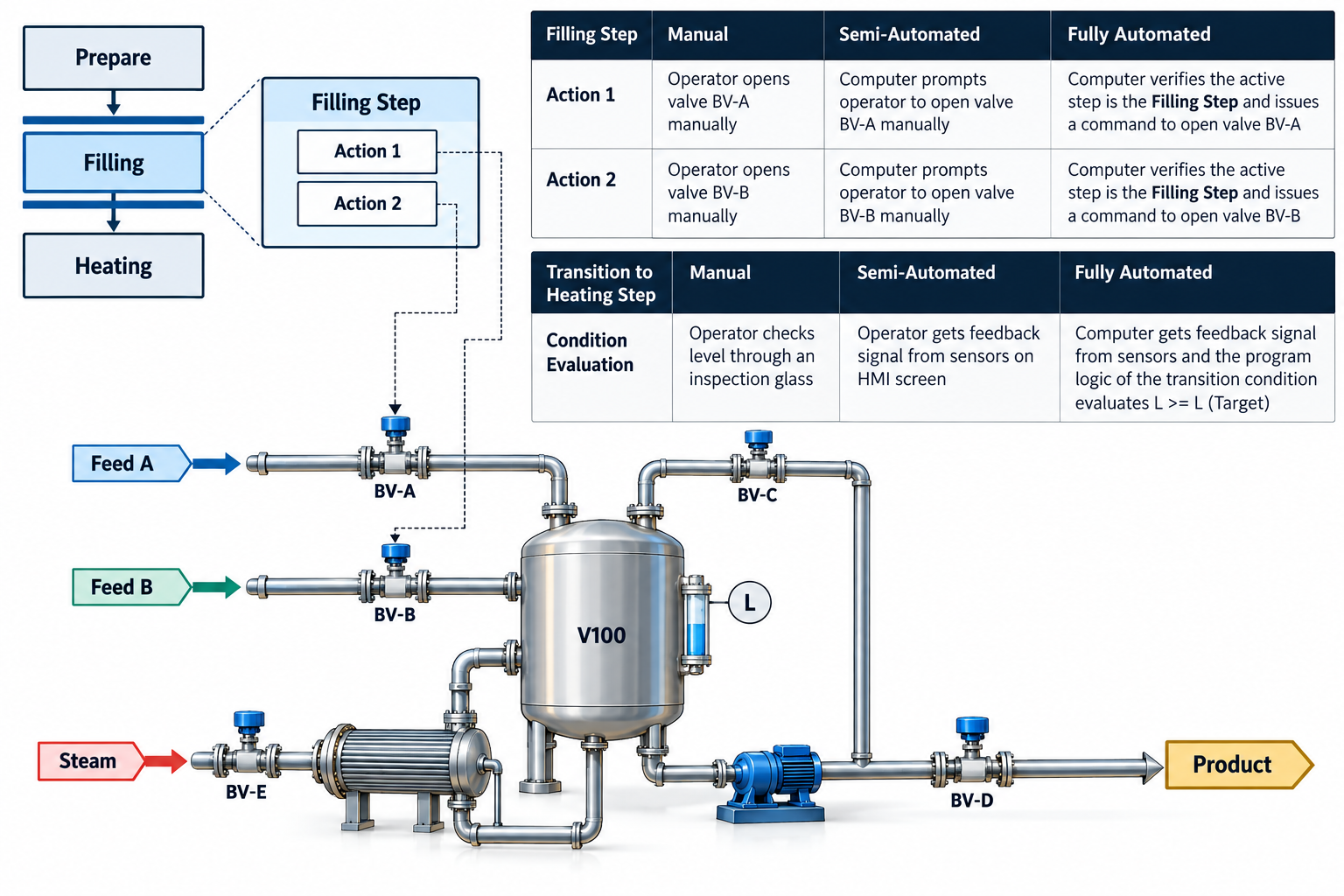
Figure 14 illustrates the enable logic architecture used in control systems.
Enable logic serves as a safety and operational control mechanism that determines when specific system functions or equipment can operate based on predefined conditions.
The enable logic typically consists of multiple input conditions that must be satisfied before allowing a control sequence to proceed. These conditions are logically combined using AND gates (where all conditions must be true) or OR gates (where at least one condition must be true) depending on the safety and operational requirements.
Key Components: - Permissive signals - conditions that must be met for safe operation (such as proper pressure, temperature within limits, or safety interlocks) - Enable commands - operator or supervisory system commands that initiate the function - Status feedback - confirmation signals from field devices indicating their current state
Industrial Example: In a pump control system, the enable logic might require that the suction valve is open, discharge pressure is within limits, motor temperature is acceptable, and an operator has issued a start command before the pump can be energized.
The enable logic acts as a gatekeeper in the control hierarchy, ensuring that equipment only operates when it is both safe and appropriate to do so. This prevents equipment damage, ensures process safety, and maintains operational integrity throughout the system.
Note: Enable logic is distinct from interlock logic - while interlocks typically shut down equipment when unsafe conditions occur, enable logic prevents startup until safe conditions are established.
5.2.8 Transition Table
Table 4 – Transition Table shown below illustrates some examples of transitions between two steps in a sequential control system.
Definition: A transition in sequential control represents the condition or event that must occur to move from one control step to the next step in the automation sequence.
Note: Understanding these transition examples will help you design proper sequencing logic for your control programs, ensuring smooth operation between different phases of your process.
Transition Table Overview
A transition table systematically defines how a control system moves from one operational state to another based on specific input conditions or events. This table serves as the logical foundation for implementing state machines in industrial control applications.
Definition: Each row in the transition table represents a unique combination of current state, input condition, and the resulting next state, along with any associated output actions.
The table structure typically includes: - Current State: The system’s present operating condition - Input/Event: The trigger condition (sensor signal, timer expiration, operator command, etc.) - Next State: The resulting operational state after the transition - Output Action: Any immediate control actions executed during the transition (such as energizing relays, updating status displays, or initiating sequences)
Industrial Example: In a conveyor system state machine, a transition might read: “If currently in STOPPED state and START_BUTTON is pressed, move to RUNNING state and energize the motor contactor.”
Note: When implementing transition tables in PLC logic, each row typically translates to conditional logic blocks (IF/THEN statements) that evaluate input conditions and execute the appropriate state changes and outputs. This systematic approach ensures predictable and reliable system behavior while simplifying troubleshooting and maintenance procedures.
| Index | Step | Acronym | Maintenance Wait | Process Wait | Filling | Heating and Recirculating | Draining | Shutdown |
|---|---|---|---|---|---|---|---|---|
| 1 | Maintenance Wait | [MW] | M | |||||
| 2 | Process Wait | [PW] | M | M | ||||
| 3 | Filling | [Fill] | A | |||||
| 4 | Heating and Recirculating | [Heat & Recy] | A/M | A | ||||
| 5 | Draining | [Drain] | M | |||||
| 6 | Shutdown | [SD] |
There may be the following types of step transitions (the ways a control sequence moves from one operation step to the next):
Definition: Step transitions are the conditions or events that cause a sequential control system to advance from its current operational state to the next programmed state.
Note: Understanding these transition types is crucial for designing reliable automated sequences, as each type responds to different field conditions and timing requirements in your control system.
- Manual: If the “from step” is active then the transition to the next step may be initiated upon an operator action requesting the transition. This step transition may be implemented in two ways: - ( (Optional Condition) AND Operator OK AND “from Step” is active) - It may include process conditions that must be true to allow the operator to request the transition. (Level > 50 AND Operator OK AND “from Step” is active)
- Automatic: If the “from step” is active then the transition to the next step may based on process conditions that must be TRUE to allow the transition to proceed. In this type, there is no operator action. - ( (Condition AND “from Step” is active) - It includes process conditions that must be true. - (Level > 50 AND “from Step” is active)
- Automatic or Manual: The combination of Automatic and Manual may exist such as: - (Automatic Condition) OR (Manual Condition AND Operator OK)
- Forced: A transition may be FORCED to override and bypass a pre-defined transition condition. A transition may be FORCED to either the ON state or the OFF state. Forcing to the OFF state blocks a transition. Forcing to the ON state overrides a transition.
In the force step operation, an operator can manually trigger a transition to another step in the control sequence, even when the normal logic conditions (the programmed requirements that must be met for automatic transitions) are not satisfied. This force option gives operators additional flexibility to override the standard sequence flow when necessary.
Industrial Example: An operator might need to force a transition to immediately shut down a reactor process when receiving an urgent maintenance request, even though the normal shutdown conditions like temperature setpoints or pressure limits haven’t been reached yet.
Important Safety Note: This is a potentially hazardous operation since it bypasses the control system’s built-in safety logic. Most facilities require elevated operator permissions or supervisor approval before allowing force operations, as incorrect use can lead to equipment damage or unsafe process conditions.
I don’t see any text provided after “TEXT TO REWRITE:” - it just says “Example” followed by “REWRITTEN TEXT:”.
Could you please provide the actual technical documentation text that you’d like me to rewrite from the perspective of a control engineer with 1 year of experience? Once you share the content, I’ll follow your rules to make it more accessible while keeping it technically accurate.
((Optional Manual Condition) AND Operator OK) OR
This logic statement represents a common safety interlock structure where the system can operate under two scenarios. The first path requires both an optional manual condition to be satisfied AND the operator to be in an acceptable state (both conditions must be true simultaneously). The second path provides an alternative route through an OR gate, though the complete logic appears truncated in this expression.
Note: This type of Boolean logic is frequently implemented in safety instrumented systems (SIS) and programmable logic controllers (PLCs) to ensure equipment operates only when specific safety and operational criteria are met.
Definition: The AND operator requires all inputs to be true for the output to be true, while the OR operator outputs true when at least one input is true.
Industrial Example: In a pump control system, this might represent “((Manual Start Button Pressed) AND (Operator at Control Panel)) OR (Automatic Start Condition)” - allowing the pump to start either through manual intervention with operator presence or through automatic sequencing.
(Optional Automatic Condition) AND from Step
Note: This appears to be a fragment of ladder logic or sequential control syntax. In programmable logic controllers (PLCs), the “AND” operator creates a series connection where both the optional automatic condition and the step-based condition must be true for the logic to execute. The “from Step” portion typically refers to a step in a sequential function chart (SFC) or similar structured programming approach, where control moves from one operational step to another based on transition conditions.
Definition: Sequential steps in control systems represent distinct operational states or phases in an automated process, with transitions between steps governed by logical conditions like this AND gate configuration.
The Forced transition (also called a Jump transition) occurs only when an operator manually initiates it through a direct command or request. This type of transition bypasses the normal automatic sequencing logic that would typically govern state changes in the control system.
Important: Forced transitions should only be implemented on transitions that have been explicitly documented with force requirements in the Functional Requirement Specification (FRS). The FRS serves as the authoritative document that defines which transitions can be operator-overridden and under what conditions this manual intervention is permitted.
Note: Since forced transitions override automatic control logic, they require careful consideration during system design to ensure safe operation and prevent unintended consequences in the process being controlled.
The method of implementation of transitions may depend upon the specific control system architecture being used, as demonstrated in Figure 15 below.
Note: Different control platforms (PLCs, DCS systems, or software-based controllers) may handle state transitions differently based on their programming languages, scan cycle timing, and internal logic processing capabilities.
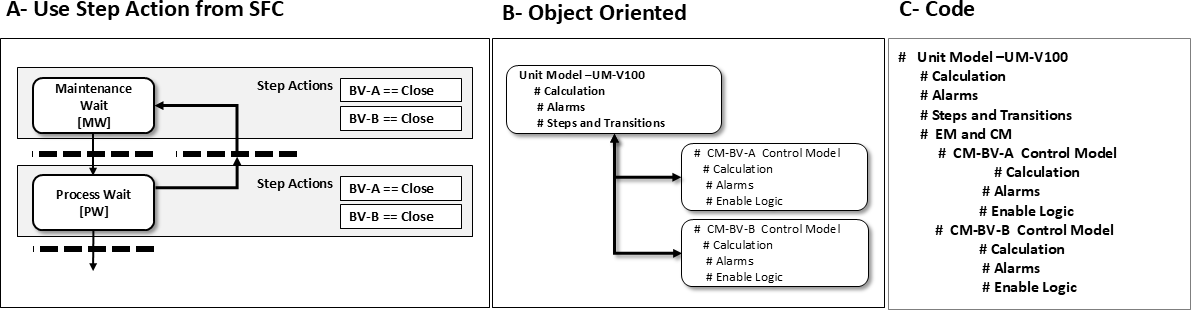
Figure 15 – Step Transition Implementation Method
This figure illustrates how step transitions are programmed and executed in sequential control systems (like those using SFC - Sequential Function Charts). The implementation method shows the logical conditions that must be satisfied for the control system to move from one operational step to the next.
Definition: A step transition occurs when the current step’s conditions are met and the system advances to the following step in the programmed sequence.
The method typically involves checking input conditions (such as sensor feedback, timer completion, or operator commands) against predefined criteria. When all transition conditions evaluate to TRUE, the active step becomes inactive and the next step in the sequence becomes active.
Note: In practice, this implementation ensures that automated processes follow a predetermined order while maintaining safety interlocks and process verification at each stage.
Industrial Example: In a bottling line, a step transition might occur when a bottle presence sensor confirms positioning AND the filling timer has completed, allowing the system to advance from the “Fill Bottle” step to the “Cap Bottle” step.
In Figure 16 below, a simple UM-CM (Utility Model-Control Model, which represents the relationship between process utilities and control system behavior) is represented.
Note: This diagram shows the basic structure of how utility management interfaces with the control model in typical industrial automation systems.
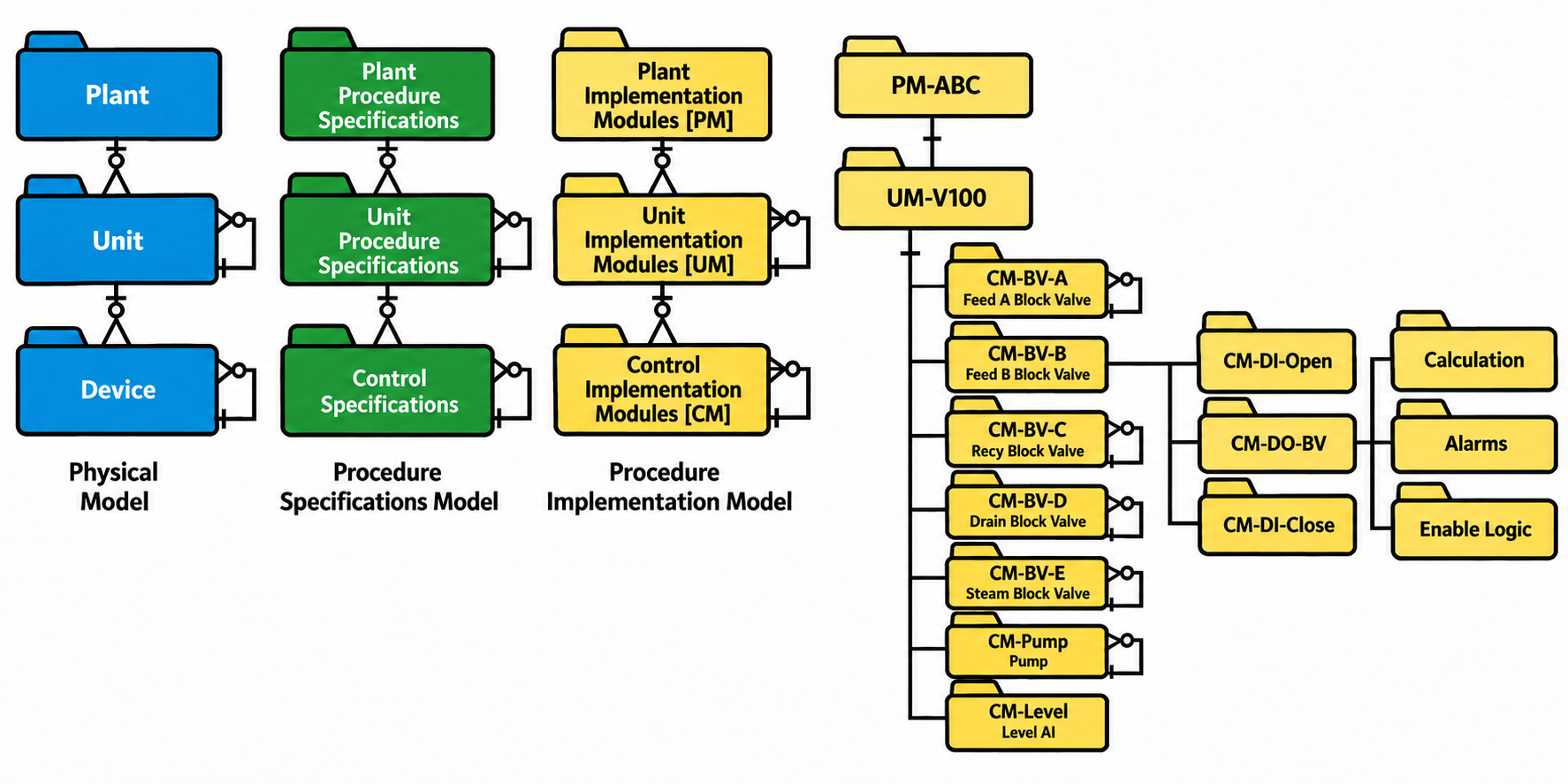
Figure 16 – Procedure Implementation Module (UM-CM)
The Procedure Implementation Module, designated as UM-CM (Unit Module - Control Module), serves as the core execution component for automated control sequences in industrial processes. This module translates high-level procedural commands into specific control actions that can be executed by field devices and instrumentation.
Definition: A Control Module (CM) is a software block that manages a specific piece of equipment or control function, containing the logic needed to operate that equipment safely and efficiently.
The UM-CM acts as an interface between the recipe management system (which defines what needs to be done) and the individual equipment modules (which perform the actual physical operations). When a batch recipe calls for a specific procedure step, the UM-CM receives these instructions and coordinates the necessary control actions across multiple equipment modules.
Industrial Example: In a chemical reactor system, the UM-CM might receive a “heat mixture to 85°C” command from the recipe and then coordinate actions between the heating element control module, temperature sensor module, and safety interlock modules to safely achieve this setpoint.
Note: The modular design allows for standardized procedure implementation across different equipment types while maintaining the flexibility to customize control logic for specific process requirements. This approach simplifies troubleshooting and reduces commissioning time since each module can be tested and validated independently.
In Figure 16, the plant Implementation Model (PM) contains only one Unit Module (UM). This UM includes seven Control Implementation Models (CMs), which are the basic control function blocks that execute specific control strategies. Six of these CMs contain an additional CM nested within them, such as CM-BV-B. These nested structures are referred to as Complex Control Modules (CCMs) because they incorporate multiple control functions in a hierarchical arrangement. The Level CM operates as a standalone control module without any embedded CM components.
Note: The hierarchical nesting of control modules allows for more sophisticated control strategies while maintaining organized system architecture. CCMs are commonly used when a single control objective requires coordination of multiple control functions.
The Step Diagram for UM-V100 shown in Figure 16 is illustrated in Figure 17 below, following the standardized definitions outlined in the annex under Model Drawing Philosophy.
Note: Step diagrams are sequential control charts that show the logical progression of valve operations and process states. The Model Drawing Philosophy provides consistent symbols and conventions for creating these control diagrams across different systems.
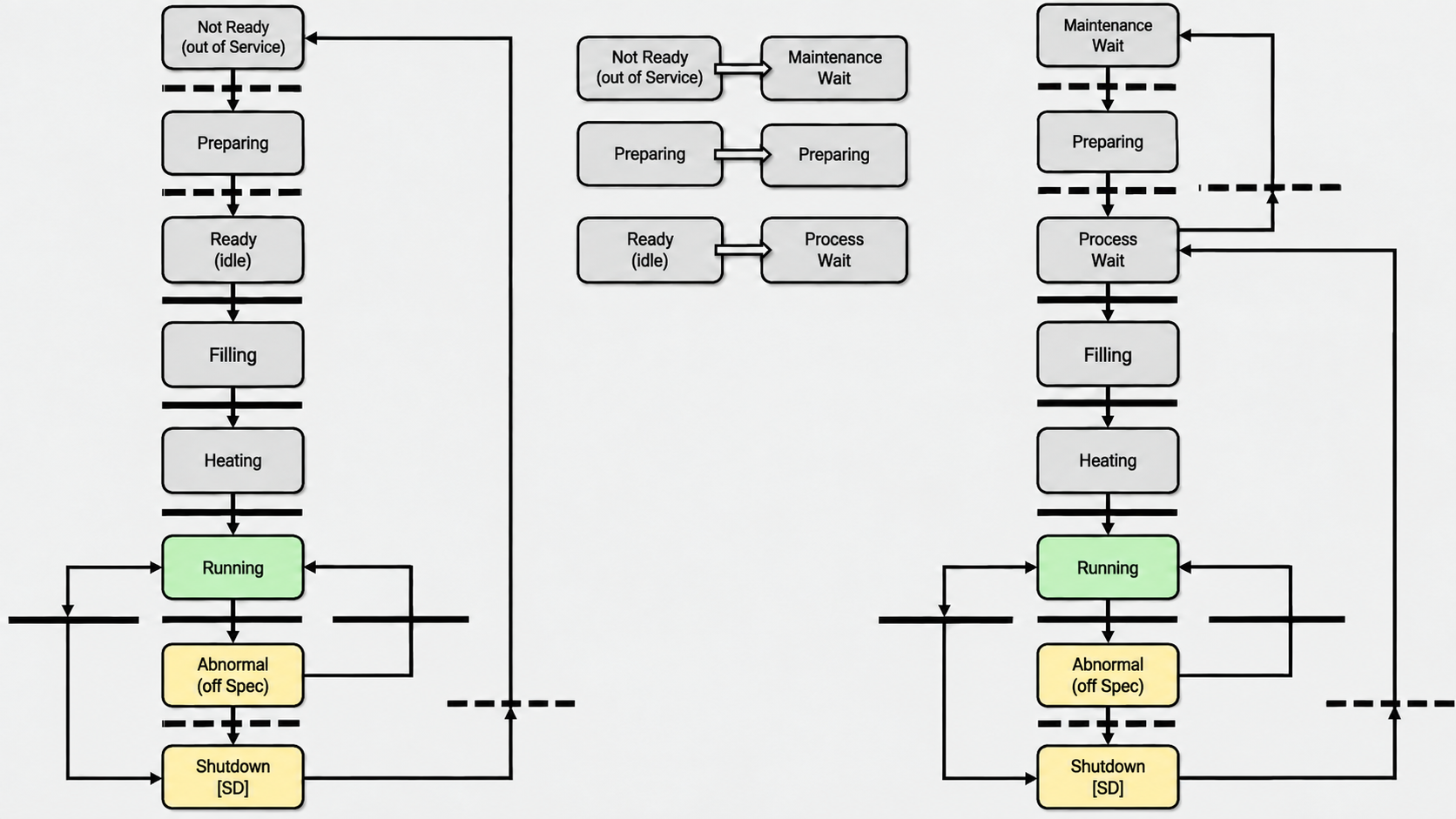
Figure 17 – Step Diagram
Note: Step diagrams are graphical representations that show the sequential progression of a control system through different operational states or phases. Each step represents a distinct condition or action in the process, making it easier to visualize and troubleshoot the control logic flow.
Definition: In ladder logic and PLC programming, steps are discrete states where specific outputs are active and certain conditions must be met before advancing to the next step in the sequence.
Industrial Example: Common applications include batch processing operations, material handling conveyors, or automated assembly lines where each step must complete before the next operation begins.
The design of the Step Diagram should place priority on the safety of personnel, environment, and equipment.
Note: Step Diagrams (also called Sequential Function Charts or SFC) define the operational sequence of your control system. When designing these diagrams, always establish safety interlocks and emergency stops before programming normal operation sequences. This means identifying potential hazards at each step and incorporating appropriate safeguards, such as pressure relief valves, temperature monitoring, or personnel lockout procedures, directly into your control logic.
Industrial Example: In a batch reactor control system, your Step Diagram should include safety checks like verifying all manual valves are closed and temperature limits are within acceptable ranges before allowing the process to advance to the next step.
Each unit or equipment in a continuous process requires a maintenance step. In the maintenance step, it is critical that the module does not start by mistake or automatically. Therefore, it is recommended that the UM step structure (Unit Module step sequence used in batch control systems) be designed with the following rules:
Safety Consideration: Accidental startup during maintenance can cause serious safety hazards and equipment damage. The step structure must include interlocks and manual confirmation requirements to prevent any automated restart while personnel are performing maintenance work on the equipment.
Definition: A UM step structure refers to the programmed sequence of operations that defines how a unit module transitions between different operational states, including startup, running, shutdown, and maintenance modes.
- The First Step should be the Maintenance Wait Step (MW). All Instruments and devices are in their correct position for maintenance to be performed.
- The Second Step should be named Process Wait (PW), which means the process can start manually by the operator.
- Only from the Process Wait, should the procedure transition to Maintenance Wait.
- The last step should be Shutdown. In this step, the process is allowed to be shut down and then move to process wait.
In the development of the EM module (electromagnetic module - typically used for motor control or electromagnetic actuator applications), the following rules apply:
Note: When working with EM modules, these guidelines help ensure proper integration with your control system and maintain reliable operation across different industrial environments. The rules that follow address both hardware interfacing and software implementation considerations that are critical for successful deployment.
- The first step should be named Not Ready
- Most of the transition should be automatic
- Normally the functionality of the Shutdown step and Not Ready step are very similar.
In Figure 17 above, the step diagram is presented with its associated step transitions (the conditions that must be met for the system to move from one operational step to the next).
Note: Step transitions are critical for proper sequence control - they act as logic gates that prevent the system from advancing until all safety and process conditions are satisfied.
5.3 State-Based Control
5.3.1 State-Based Control – Introduction
As automation systems become more complex, they incorporate deeper process knowledge (understanding of how the specific industrial process behaves) and can execute more sophisticated control operations. Using discrete steps provides a structured framework for organizing automated procedures when implementing these advanced automation styles. This approach to procedure automation is known as State-Based control.
Definition: State-Based control organizes automation logic into distinct operational states or steps, where each state represents a specific phase of the process with defined entry/exit conditions.
Industrial Example: In a batch reactor system, states might include “Fill Tank,” “Heat to Temperature,” “Add Catalyst,” and “Drain Product” - each with specific conditions that must be met before advancing to the next state.
Procedure automation focuses on controlling a single major piece of process equipment (like a reactor, distillation column, or heat exchanger). The automation steps are structured around the actual physical states and conditions that the equipment goes through during its operation cycle. This approach ensures both safe operation and optimal efficiency by matching the control logic to the equipment’s natural operational phases.
Industrial Example: For a distillation column, the automated procedure steps typically include: - Initial conditions check (verify column is empty and systems are ready) - Startup sequence (begin heating, establish reflux flow) - Feed introduction (gradually bring feed online while monitoring temperatures) - Steady-state operation (maintain separation efficiency through temperature and flow control) - Product quality verification (ensure top and bottom products meet specifications) - Shutdown sequence (safely reduce feeds, cooling, and product withdrawal)
Note: Each step includes specific interlocks and safety checks that must be satisfied before proceeding to the next phase. This prevents equipment damage and ensures process safety throughout the entire operational cycle.
- Not Ready (Out of Service)
- Preparing
- Ready (Idle)
- Filling
- Heating (Total Reflux)
- Running
- Abnormal (Off-spec)
- Shutting Down
Step transitions control which steps can follow each other in a sequential process and specify the exact conditions (such as sensor inputs, timer completions, or operator commands) that must be met to move from the currently active step to the next step in the sequence.
Note: Think of transitions as the “gates” between steps - they prevent the program from jumping randomly between steps and ensure the process follows a logical, safe sequence based on real-world conditions.
The definition of the steps and step transitions can be formalized using a step transition diagram (a visual flowchart that maps out the sequence of operations and the conditions that trigger moves between them). Figure 18 below shows a simplified example of the steps listed above in the Steps Transition Diagram. The rectangles represent individual steps (discrete operational states or phases), and the arrows represent step transitions between steps (the logic conditions that must be met to move from one step to the next).
Note: The solid horizontal lines and dashed horizontal lines have specific meanings related to the model drawing philosophy - refer to the annex for detailed significance of these line types in system documentation.
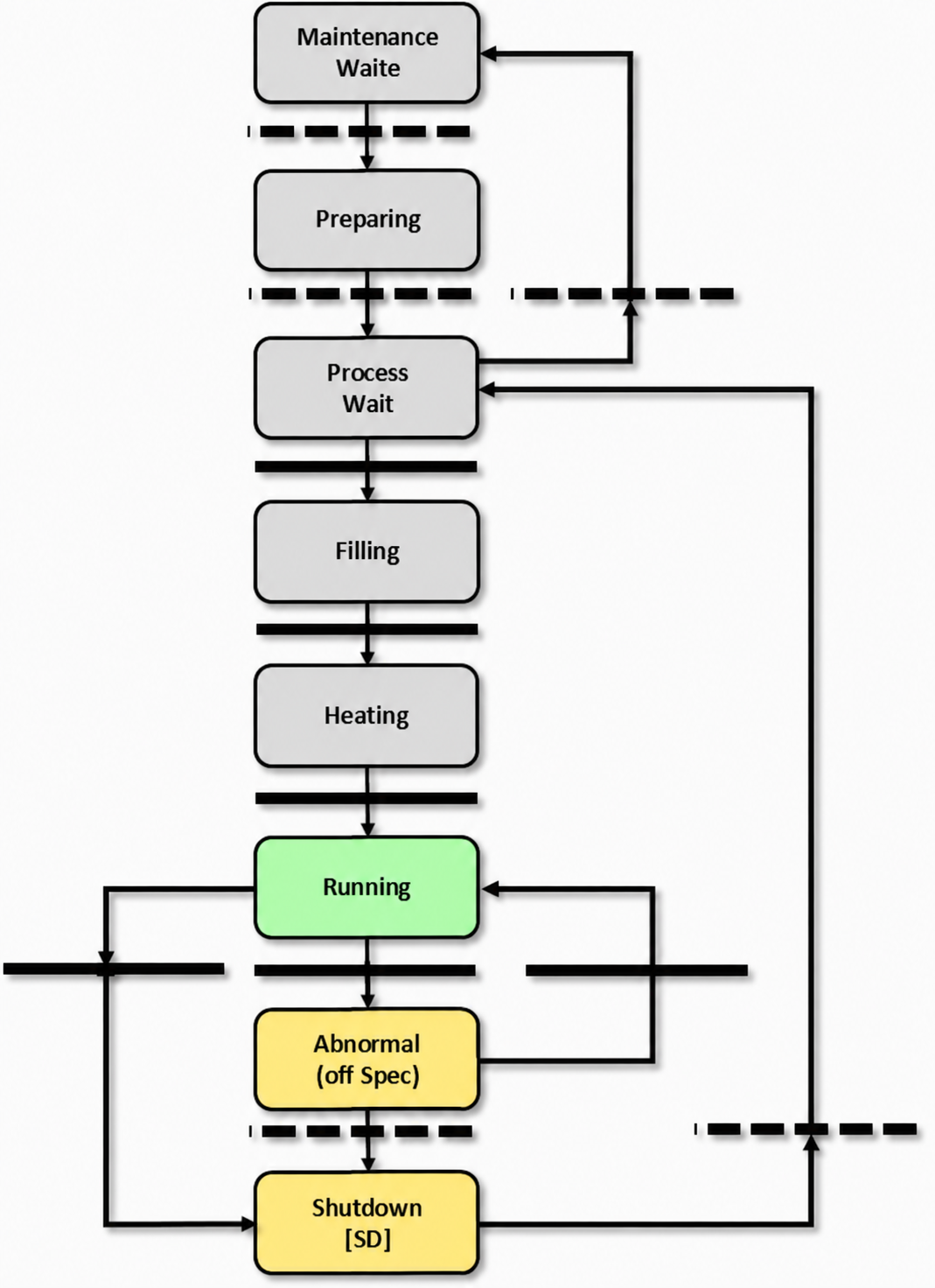
Figure 18 – Step Transition Diagram
This diagram illustrates the fundamental structure of sequential control logic, where the system progresses through discrete operational states (steps) based on specific input conditions (transitions). Each step represents a stable control state where certain outputs remain active, while transitions define the logic conditions that must be satisfied to move from one step to the next.
Note: In practical PLC programming, steps typically correspond to outputs like valve positions or motor states, while transitions are evaluated using sensor inputs, timers, or operator commands.
The step-transition format provides a clear visual representation of the control sequence, making it easier to troubleshoot and modify automated processes. When a transition condition becomes true, the system deactivates the current step and activates the subsequent step, ensuring only one step is active at any given time in a basic sequential chain.
Industrial Example: In a simple tank filling operation, Step 1 might be “Fill Valve Open” with a transition condition of “Tank Level High,” leading to Step 2 “Fill Valve Closed.”
Some of the steps in Figure 18 represent steady-state conditions (stable operating points where process variables remain constant), such as Not Ready, Ready, and Running, while others represent transitory states (temporary conditions during transitions), such as Preparing, Filling, Heating, and Shutting Down. The transitory states are used to safely move the process from one steady-state condition to another.
Note: During steady-state conditions, your control loops maintain setpoints with minimal adjustments, while transitory states typically require more active control intervention to manage the transition smoothly.
The step-based approach also provides a practical way to manage alarm activation and suppression. For instance, when a distillation column is in the NOT READY step, alarms that are specifically designed for the RUNNING step can be automatically disabled. This prevents alarm flooding (overwhelming the operator with irrelevant alarms) by suppressing alerts like low flow or low level conditions that aren’t meaningful during startup or shutdown phases.
Industrial Example: During column startup, low reflux flow alarms should be suppressed since the column isn’t expected to have normal flow rates until it reaches steady-state operation.
The automated control procedures that guide the process through state transitions (moving from one operating mode to another) handle this alarm management automatically. As the system moves to a new step, these procedures enable alarms that are relevant to the current operating state while disabling alarms that were appropriate for the previous step but no longer apply to the new operational conditions.
Note: This selective alarm management is crucial for maintaining operator effectiveness and preventing alarm fatigue, which can lead to missed critical alerts.
5.3.2 Mode of Operation
Mode of operation provides a high-level summary of the current process steps, serving two main purposes: enabling different control system modules to communicate their status with each other, and displaying understandable process information to plant operators on the HMI (Human Machine Interface).
Definition: Think of it as a simplified status indicator that translates complex internal system states into meaningful information that both software modules and operators can easily interpret.
Industrial Example: In a batch reactor system, instead of tracking dozens of individual valve positions and sensor readings, the mode of operation might simply display “Filling,” “Heating,” “Reacting,” or “Discharging” to give everyone a clear picture of where the process currently stands.
Figure 19 displays the state transition diagram for this process. The FILLING and HEATING steps have been grouped together into the Start-up mode of operation. Since both of these states are transitory (temporary states that the system passes through rather than remains in), they support the process as it transitions from the Ready state to the Running state. From an operator interface perspective, these transitory states can be presented as a single combined mode of operation, which simplifies the display and reduces operator workload.
Note: The grey boxes shown in the figure represent the different modes of operation, while the individual states show the specific process steps within each mode.
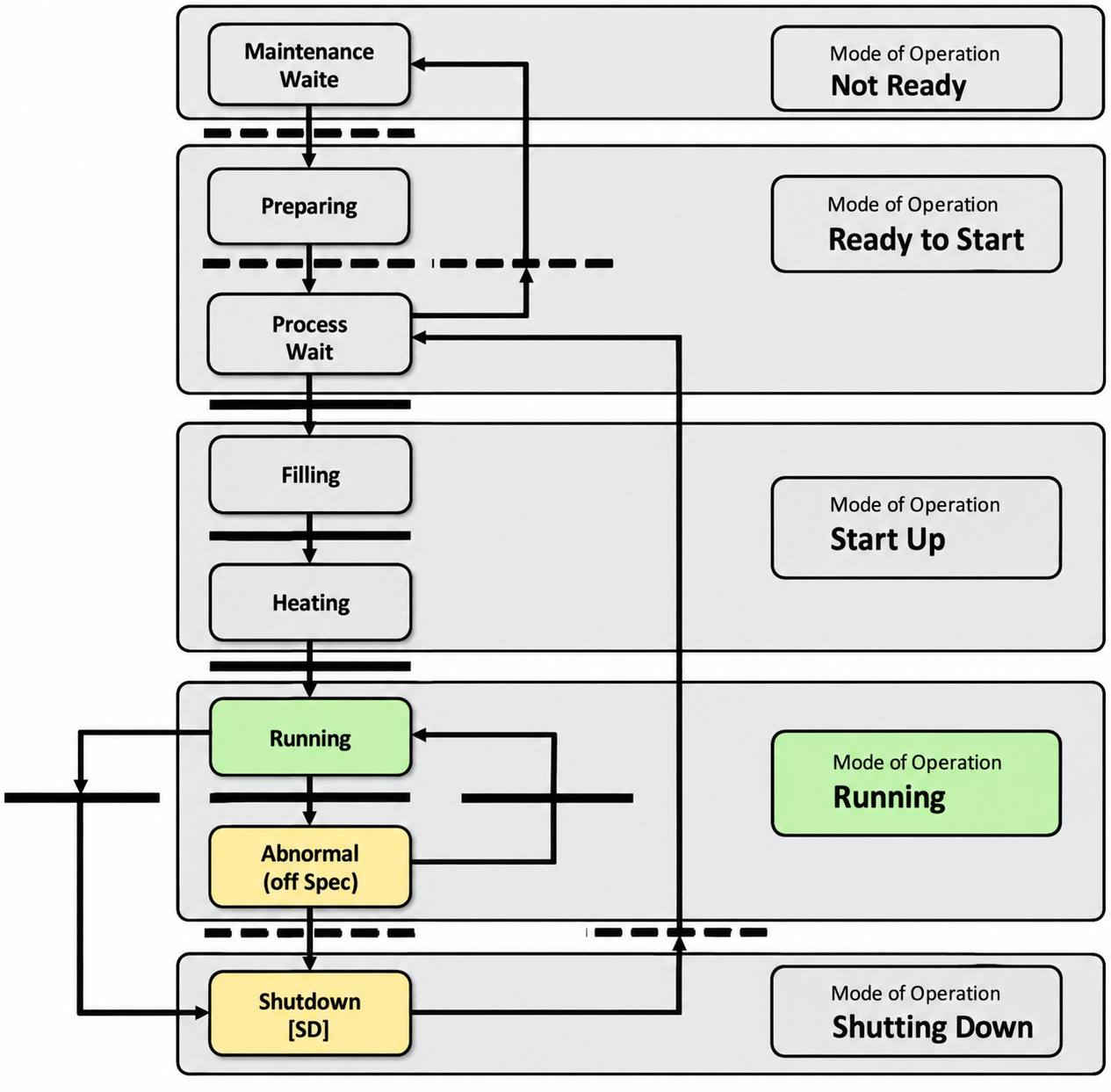
Figure 19 illustrates the sequential steps and operational modes
that define how the control system transitions between different states during normal operation. Each step represents a distinct phase in the process cycle, while the modes of operation determine the specific control logic and parameter sets that govern system behavior.
Note: Understanding these operational transitions is crucial for proper system commissioning and troubleshooting, as each mode may require different tuning parameters or safety interlocks.
The steps shown typically follow a predetermined sequence (often called a state machine), where progression from one step to the next depends on specific conditions being met, such as sensor feedback confirming a completed action or timer expiration. The modes of operation work in parallel with these steps, defining whether the system runs in manual, automatic, or maintenance mode, each with its own set of control algorithms and operator permissions.
Definition: A state machine is a control logic structure where the system can only be in one specific state at a time, and transitions between states occur based on predefined conditions and inputs.
Similarly, the RUNNING and ABNORMAL steps have been combined into a single Running mode of operation. This consolidation makes sense because the ABNORMAL step doesn’t actually shut down the distillation column - instead, it maintains operation while the control system works to restore process conditions back to the normal operating parameters required by the standard RUNNING step.
Note: In distillation control, keeping the column running during abnormal conditions (rather than shutting down) is often preferred because thermal cycling and restarts can be costly and time-consuming, especially for large industrial columns.
Building on the previous figure, Figure 20 illustrates specific procedures that correspond to different operational modes in the distillation column control system. The system uses several key transition procedures to move between steady-state operating conditions: Prepare, Start-up, Production Rate of Change, and Controlled Shutdown. Each procedure manages the complex sequence of control actions needed to safely transition the column from one stable operating point to another.
Note: Steady states refer to operating conditions where key process variables (temperature, pressure, flow rates) remain relatively constant over time.
The Abnormal Condition Handling procedure serves a different purpose - it activates during the ABNORMAL step when process conditions deviate beyond acceptable limits. This procedure implements corrective control actions to restore normal operating parameters and return the distillation column to the RUNNING step.
Industrial Example: If column pressure exceeds safety limits or product quality falls outside specifications, the Abnormal Condition Handling procedure would automatically adjust control valve positions, modify heating rates, or change reflux ratios to bring the system back to normal operation.
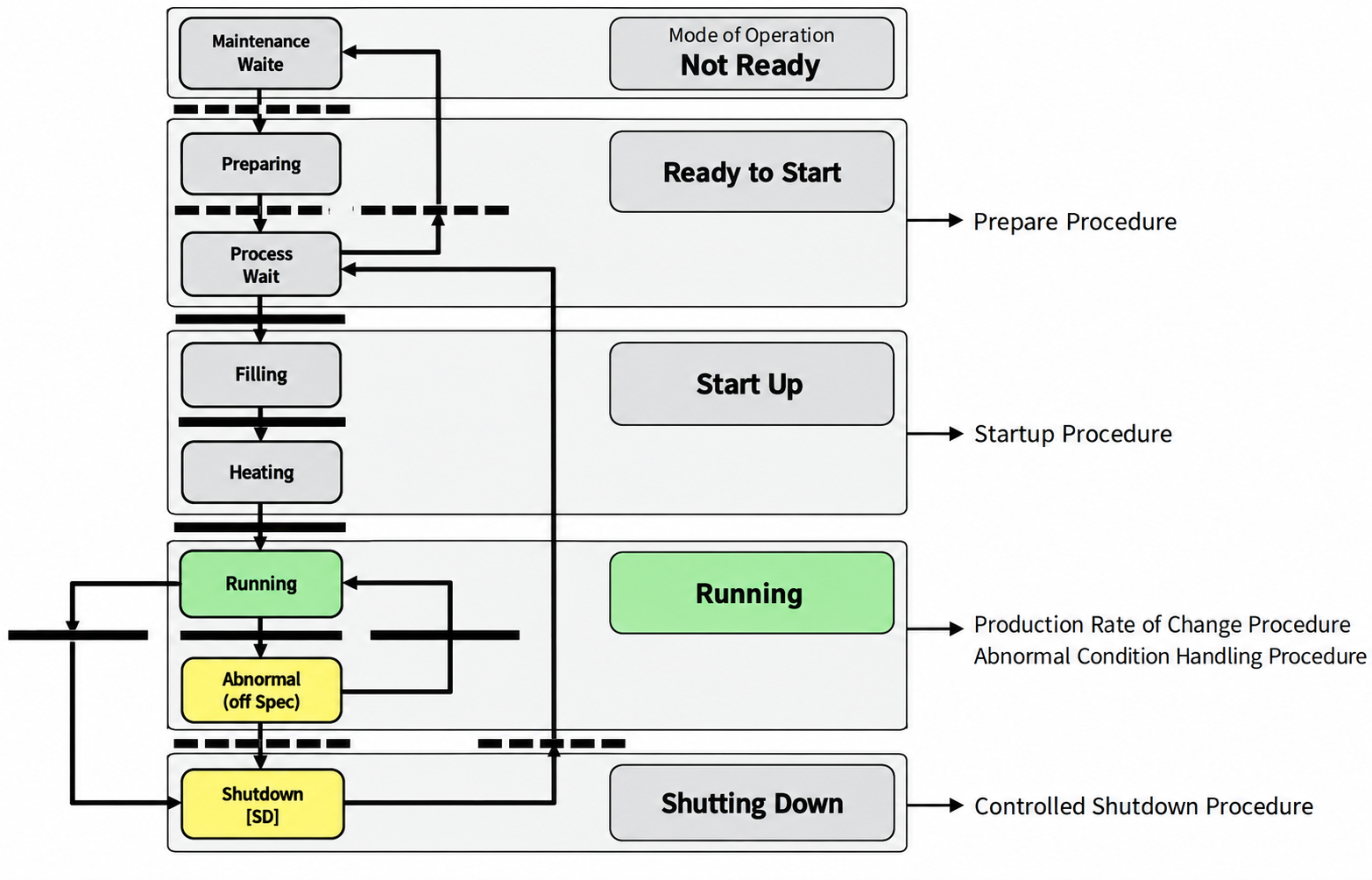
Figure 20 – Procedures Mapped to Modes of Operation and Steps
This figure illustrates how specific operational procedures align with different operating modes and their corresponding process steps. In control systems, operating modes define the current state of the equipment or process (such as manual, automatic, startup, or shutdown), while steps represent the sequential actions within each mode.
Definition: Operating modes are predefined control states that determine how the system responds to inputs and executes commands, while steps are the individual actions or phases that occur within each mode.
The mapping shown demonstrates the relationship between what the system needs to do (procedures), how it should behave (modes), and the specific sequence of actions (steps). This three-level hierarchy helps control engineers understand which procedures are available in each operating mode and ensures that the correct sequence of steps is followed for safe and efficient operation.
Industrial Example: In a batch reactor system, the “Automatic” mode might include procedures like “Heat-up,” “Reaction,” and “Cool-down,” with each procedure containing multiple steps such as “Open inlet valve,” “Start agitator,” and “Monitor temperature.”
Understanding this mapping is crucial for implementing proper interlocks, designing operator interfaces, and troubleshooting control logic issues.
Operators can use these procedures to execute the required control actions. When the procedure is automated (meaning it runs without manual intervention), it automatically triggers the execution of implementation modules, as illustrated in Figure 21.
Note: Implementation modules are the software components that contain the actual control logic and commands that get sent to field devices like valves, motors, or sensors.
As shown in Figure 21, when an operator executes a single procedure from their interface, the system actually runs multiple implementation modules organized in a hierarchical structure (layers of modules where higher-level modules coordinate lower-level ones).
Note: This means what looks like one simple command to the operator - like “Start Batch Process” - might trigger a cascade of individual control modules handling tasks like valve positioning, pump control, temperature regulation, and safety interlocks, all working together in a coordinated sequence.
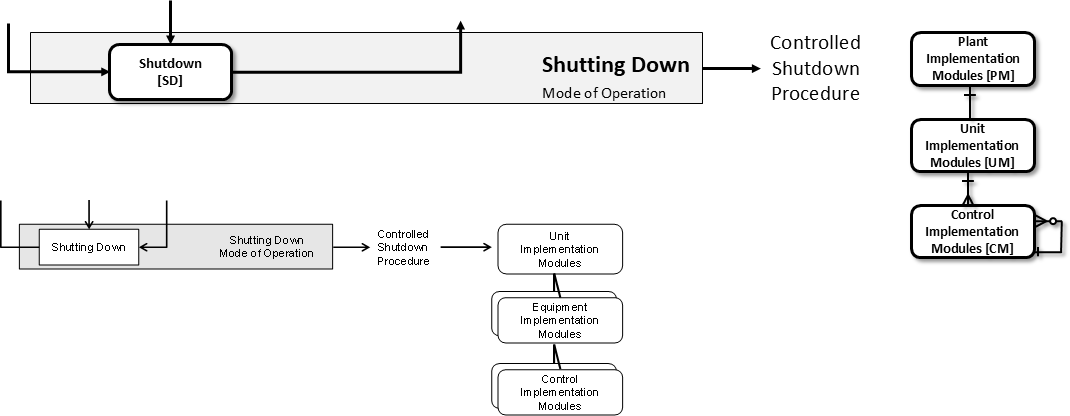
Figure 21 – Procedures Mapped to Implementation Modules
This figure illustrates how operational procedures are linked to their corresponding implementation modules within the control system architecture. Each procedure (the specific sequence of operations or control logic) is mapped to a dedicated software module that executes the required functionality.
Note: Implementation modules are self-contained software components that handle specific control tasks, such as PID loops, safety interlocks, or sequencing operations. This mapping approach ensures clear traceability between what the system needs to do (procedures) and how it accomplishes those tasks (modules).
Industrial Example: A startup procedure for a pump might map to an implementation module containing the logic for valve positioning, motor sequencing, and pressure verification checks.
This modular mapping strategy helps maintain organized code structure, simplifies troubleshooting, and enables easier system modifications during commissioning or future upgrades.
State-based control can be implemented at various Physical Model levels beyond just the individual unit level (such as equipment level, area level, or plant-wide level).
Definition: Physical Model levels refer to the hierarchical structure used in process control systems, where the unit level typically represents individual pieces of equipment like pumps, valves, or reactors.
Industrial Example: While you might use state-based control for a single reactor unit, you could also apply it to coordinate multiple units within an entire production area, or even across different areas of a manufacturing plant to manage complex process sequences and transitions.
State-based control can be implemented on an equipment module that uses two pumps configured together to provide process flow. In this configuration, the control system manages different operational states (such as “Pump A Active,” “Pump B Active,” “Both Pumps Running,” or “Standby Mode”) based on flow demand, pump health, and system conditions.
Definition: State-based control is a control strategy where the system operates in distinct, well-defined modes or states, with clear transition conditions between each state.
Industrial Example: A dual-pump system might automatically switch from single-pump operation to dual-pump operation when flow demand exceeds a setpoint, or switch to the backup pump when the primary pump shows fault conditions or requires maintenance.
Figure 22 demonstrates how state-based control can be implemented at the plant area Physical Model level (the hierarchical level that manages multiple process units within a production area). In this configuration, a plant area implementation module acts as the supervisory controller that sends control commands to individual unit implementation modules while simultaneously receiving status responses and alarm notifications from those same units.
Note: This represents a typical master-slave control architecture where the plant area level coordinates operations across multiple process units, similar to how a production supervisor manages several operators on a factory floor.
Beyond the typical downward flow of commands from supervisory control systems to field-level controllers during normal operation, robust exception handling requires bidirectional communication that allows lower-level modules (such as PLCs or local controllers) to report faults, alarms, and status updates back up to higher-level systems (like SCADA or MES).
Note: This upward communication path is critical for proper fault detection and system-wide coordination. Without it, upper-level systems would remain unaware of field-level issues that could impact overall process performance or safety.
This communication between procedure model levels (the hierarchical layers that define how control operations are organized and executed) is illustrated in Figure 22 below.
Note: In industrial control systems, procedure models typically consist of multiple levels such as unit procedures, operations, and phases, where each level communicates specific control instructions and status information to adjacent levels in the hierarchy.
Each unit operates autonomously, handling its own assigned tasks without direct coordination with other units. However, the overall process often requires synchronized activities between these independent units. To achieve this coordination, specific process data (such as flow rates, temperatures, or status signals) must be communicated upward to a supervisory control level. This higher-level controller evaluates the collected information and sends explicit commands back down to individual units when coordination is needed.
Industrial Example: In a conveyor system, each motor drive unit controls its own belt speed independently, but when material needs to transfer smoothly between conveyors, the supervisory controller must coordinate the speed setpoints across multiple units to prevent jamming or spillage.
Note: This describes a hierarchical control architecture where local controllers handle routine operations while a master controller manages inter-unit coordination.
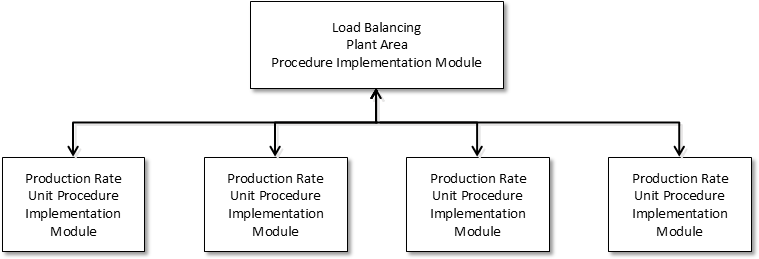
Figure 22 – Interactions Between Implementation Modules at Different Physical Model Levels
This figure illustrates how various implementation modules communicate and interact across different abstraction levels of a physical system model. In control system design, we typically work with multiple model representations of the same physical process - from high-level system behavior down to detailed component-level dynamics.
Definition: Implementation modules are software or hardware components that execute specific control functions, such as PID controllers, state estimators, or signal processors.
The interactions shown demonstrate the hierarchical relationship between system-level control strategies (top level), subsystem coordination (middle level), and individual actuator/sensor interfaces (bottom level). Data flows both upward (sensor feedback and status information) and downward (control commands and setpoints) through these levels.
Note: Understanding these inter-module communications is crucial for debugging control system issues, as problems at one level can propagate to others. For example, a sensor calibration error at the physical level can affect state estimation at the middle level, ultimately impacting overall system performance at the top level.
This multi-level approach allows for modular design where changes to one implementation module can be made with minimal impact on others, provided the interface protocols (communication standards between modules) remain consistent.
5.3.3 Module State Table
The Module State Table displays the operational status of each subordinated module (individual control units that report to a higher-level controller) at every step in the sequence. The Step State table provides a condensed overview of each CM’s (Control Module’s) status during a specific step in the process.
Definition: A subordinated module is essentially a lower-level controller that receives commands from and reports back to a master or supervisory controller in the hierarchy.
Note: Think of this like a status dashboard - the Module State Table gives you detailed information about what each individual module is doing at any given time, while the Step State table gives you the big picture of where each Control Module stands in the overall process sequence.
The following Module State Tables are displayed below:
- Device State Table: See Table 5 below where the column represents the UM steps, and the rows represent the subordinate CM. The cells represent the state of each CM where the shade of green indicates TRUE and yellow indicates FALSE. The use of a Bold font indicates that the CM changed state.
Table 5 – Device State Table for UM (Unit Module)
Definition: A Unit Module (UM) represents a collection of equipment that performs a specific process function, such as a reactor, distillation column, or heat exchanger. The device state table defines all possible operational states this equipment can be in during normal and abnormal conditions.
Note: Device states are standardized conditions that help operators and control systems understand what the equipment is currently doing and what actions are permissible. Each state transition must be carefully programmed to ensure safe operation.
Industrial Example: In a reactor UM, typical states might include “Stopped” (equipment is off and safe), “Starting” (transitioning to operation), “Running” (normal production), “Stopping” (controlled shutdown), and “Aborting” (emergency shutdown sequence).
The state table serves as a reference for programmers implementing the control logic and helps ensure consistent behavior across similar equipment types in the plant.
| UM Steps | UM Steps | UM Steps | UM Steps | UM Steps | UM Steps | ||
|---|---|---|---|---|---|---|---|
| CM Name | CM Description | MW | PW | Fill | Heat & Rec | Drain | SD |
| BV-A | Feed A | Closed | Closed | Open | Open | Closed | Closed |
| BV-B | Feed B | Closed | Closed | Open | Open | Closed | Closed |
| BV-C | Recycle | Closed | Closed | Closed | Open | Closed | Closed |
| BV-D | Drain | Closed | Closed | Closed | Closed | Open | Closed |
| BV-E | Steam | Closed | Closed | Closed | Open | Closed | Closed |
| PMP-A | Pump | Stopped | Stopped | Stopped | Run | Run | Stopped |
- Equipment State Table: Assuming that the pump is defined as EM with the following CMs (the Pump EM has Device State Table as shown in Table 6 below) - BV-I: Pump Intake Block Valve - MOTOR: Pump Motor - BV-D: Pump Discharge Block Valve
Table 6 – Device State Table for Emergency Stop (EM) Function
This table defines the operational states and transitions for emergency stop devices within the safety control system. Each state represents a specific condition of the EM device and its associated safety outputs.
Definition: Device state tables document how safety devices behave under different conditions and what actions they trigger in the control system.
Note: Understanding these states is crucial for proper integration with your main control logic, as emergency stop functions will override normal operation and require specific reset sequences before resuming automated processes.
The state transitions shown here follow IEC 61508 safety standards (international standard for electrical/electronic safety-related systems) and must be implemented exactly as specified to maintain the required Safety Integrity Level (SIL) rating for your application.
Industrial Example: In a typical manufacturing line, when an operator presses an emergency stop button, the system transitions from “Normal Operation” state to “Emergency Stop Active” state, immediately cutting power to all hazardous motion and requiring manual reset before production can resume.
| EM Steps | EM Steps | EM Steps | EM Steps | EM Steps | EM Steps | ||
|---|---|---|---|---|---|---|---|
| CM Name | CM Description | Not Ready | Ready | Start Motor | Run | Stop Motor | SD |
| BV-I | Pump Intake BV | Closed | Closed | Closed | Open | Open | Closed |
| BV-D | Pump Discharge BV | Closed | Closed | Closed | Open | Open | Closed |
| MOTOR | Pump Motor | Stopped | Stopped | Start | Start | Stopped | Stopped |
- UM Steps vs Pump Mode of Operation: The UM utilizes the Mode of Operation to communicate with the Pump EM. See Table 7 below where X indicates the UM at that step will request the selected Mode of Operation from the Pump EM.
Table 7 presents the relationship between UM steps and pump operating modes. UM steps refer to the discrete control positions or stages that the pump controller can execute (essentially the incremental adjustments the system makes to pump operation). Understanding this relationship is crucial for proper pump control implementation.
Definition: UM steps are the granular control increments that determine how finely you can adjust pump performance parameters like speed, flow rate, or pressure output.
The pump mode of operation defines the current operational state of the pump system, which directly influences how the controller interprets and executes these UM steps. Different operating modes may utilize the same UM step values differently, depending on the control strategy programmed into the system.
Note: When commissioning pump systems, always verify that the UM step configuration aligns with your specific operating mode requirements, as mismatched settings can lead to unstable control or inadequate system response.
This table serves as a reference for determining the appropriate UM step settings based on your desired pump operating characteristics and helps ensure optimal control loop performance across different operational scenarios.
| UM Steps | UM Steps | UM Steps | UM Steps | UM Steps | UM Steps | |
|---|---|---|---|---|---|---|
| PMP MofO | MW | PW | Fill | Heat & Rec | Drain | SD |
| Stop | X | X | ||||
| Ready | X | |||||
| Run | X | X | ||||
| Stop | X |
- EM Mode of Operation and the EM Steps: See Table 8 below where X indicates the UM at that step will request the selected Mode of Operation from the Pump EM.
Table 8 – EM Mode of Operation vs EM Steps
This table correlates the Emergency Mode (EM) operating states with their corresponding step sequences in the control logic. Each EM mode represents a specific safety or operational condition that triggers a predefined sequence of automated actions.
Definition: EM Steps refer to the sequential control actions executed by the programmable logic controller (PLC) when an emergency mode is activated.
The relationship between EM modes and their associated steps is critical for understanding system behavior during fault conditions or emergency shutdowns. When an EM mode is triggered (either automatically through safety interlocks or manually by operators), the controller executes the corresponding step sequence to bring the system to a safe state.
Note: Understanding this mapping is essential for troubleshooting emergency scenarios, as it allows you to predict which control actions will occur based on the active emergency mode. This is particularly important during commissioning and when analyzing event logs after an emergency shutdown.
Industrial Example: If EM Mode 3 corresponds to “Low Process Pressure Emergency,” the associated EM steps might include: Step 1 - Close main inlet valve, Step 2 - Start backup compressor, Step 3 - Activate pressure relief system, Step 4 - Generate operator alarm.
The step sequences are typically designed with fail-safe principles, meaning they default to the safest possible equipment positions if communication or power is lost during execution.
| EM Steps | EM Steps | EM Steps | EM Steps | EM Steps | EM Steps | |
|---|---|---|---|---|---|---|
| PMP MofO | Not Ready | Ready | Start Motor | Run | Stop Motor | SD |
| Stop | X | |||||
| Ready | X | X | ||||
| Run | X | X | ||||
| Stop | X |
In Figure 23 below, each CM (Control Module - the software block that executes control logic) with Analog Output or Digital Output should have an Enable Logic placeholder. This Enable Logic acts as a conditional gate that, based on pre-defined system conditions, will either enable the CM output (switching to Open, Run, or Auto modes) or disable the CM output (forcing it to Close, Stop, or Manual modes).
Note: The Enable Logic essentially acts as a safety interlock mechanism, allowing the control system to automatically override normal operation when certain conditions aren’t met, such as equipment faults, safety violations, or process limits being exceeded.
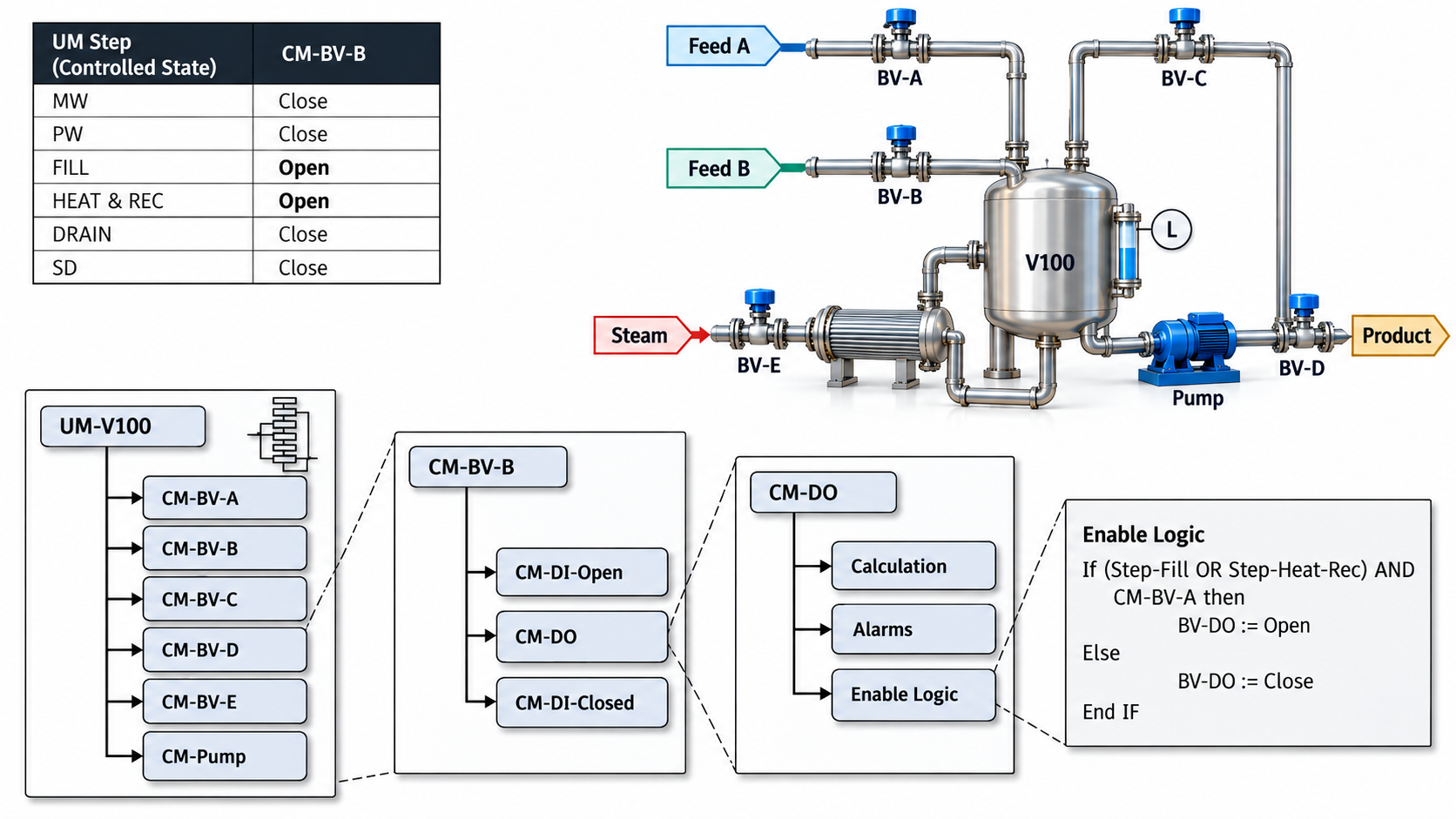
Figure 23 – UM-CM Interactions
This figure illustrates the communication pathways between the Unit Module (UM) and Control Module (CM) components within the control system architecture. The UM represents higher-level unit operations (like a reactor or distillation column), while the CM handles lower-level equipment control functions (such as valve positioning or pump control).
Key Interaction Points:
- Command flow travels downward from UM to CM, carrying setpoints and operational modes
- Status feedback flows upward from CM to UM, providing current values and equipment health information
- Bidirectional data exchange enables coordinated control between unit-level strategies and equipment-level execution
Note: Understanding these interactions is crucial for troubleshooting communication issues and ensuring proper coordination between different control layers in your distributed control system (DCS) or programmable logic controller (PLC) network.
The following requirements apply to state-based control implementation (control systems that make decisions based on discrete operating conditions or modes):
Definition: State-based control uses predefined operating states (like “startup,” “normal operation,” or “shutdown”) where the controller behavior changes depending on which state the system is currently in.
Note: Unlike continuous control (such as PID loops that constantly adjust outputs), state-based control makes discrete decisions - the system is either in one state or another, never partially in multiple states.
All state changes require appropriate interlocking logic to prevent unsafe transitions. For example, a system should not transition directly from “emergency stop” to “high-speed operation” without passing through intermediate safety checks and startup sequences.
Industrial Example: A conveyor system might have states for “stopped,” “starting up,” “running,” and “fault condition.” The control logic ensures it cannot jump directly from “stopped” to “running” without completing the startup sequence first.
The implementation must include timeout protection for state transitions and provide clear feedback to operators about the current system state through appropriate status indicators or HMI displays.
5.3.4 Requirement
- The Procedure Owner shall ensure that there is a step transition “incoming” condition as well as a step transition “outgoing” condition for each step.
5.3.5 Requirement
- The Procedure Owner should ensure that each implementation module (such as EM, UM, or higher) has its steps and step transition defined.
5.3.6 Requirement
- The Procedure Owner shall ensure that the step transition condition always contains the AND step (From) at the end of its condition or accomplish via the built-in functionality of the SFC.
5.3.7 Requirement
- The Procedure Owner shall ensure that there shall be only one step active at any time.
5.3.8 Requirement
- If multiple transitions become true at the same time, the Procedure Owner shall ensure that the transitions are prioritized automatically.
5.4 Sequence-Based Control
Sequence-Based Control is an automation and process control design approach that implements control logic by following the same step-by-step procedures that an operator would manually perform, maintaining the natural order of operations with little to no deviation from the standard process flow. This paradigm essentially translates written operating procedures directly into programmable logic controller (PLC) code or distributed control system (DCS) logic.
Key Principle: The control logic mirrors the sequential steps found in standard operating procedures (SOPs), making the automated system behave similarly to how a skilled operator would run the process manually.
Industrial Example: In a batch reactor startup sequence, the control logic would follow the exact same steps as the written procedure - first verify initial conditions, then open inlet valves in specified order, start agitation, begin heating to setpoint, and monitor for completion criteria before proceeding to the next phase.
See Figure 24.
5.4.1 Utilization of Steps in Sequence-Based Control
Sequence-Based Control defines individual steps, the conditions that trigger transitions between steps (step transitions), and the specific actions that must be executed during each step. The control system can also define relative timing requirements (the order and timing relationships between operations) as needed. When a step becomes active in the sequence, all of its associated step actions are automatically executed.
Note: Some control software and documentation may use the term “phase” to describe a higher-level grouping of multiple steps, but in Sequence-Based Control terminology, a step can contain any number of step actions, from very simple to highly complex operations.
The size or complexity of a step depends entirely on the application and perspective.
Industrial Example: In a refinery startup sequence, “Start Coker Unit” might be considered a single step within the larger plant startup, even though it contains dozens of individual operations. Conversely, during the coker unit startup itself, “Open Valve XV-101” might be its own dedicated step with just one step action. The granularity (level of detail) you choose for defining steps should match the control requirements and operational needs of your specific process.
For a feed reduction application, a step may be created to reduce feed to the unit while there may be another step to maintain the levels of all the drums and towers (pressure vessels and distillation columns in the process). Both steps may be active at some point during the application execution, and the level maintenance phase may continue to run after the feed reduction is completed.
Note: This demonstrates how sequential control steps can overlap in time rather than running strictly one after another. The level control step ensures process stability while the primary feed reduction step executes, then continues operating independently to maintain safe operating conditions.
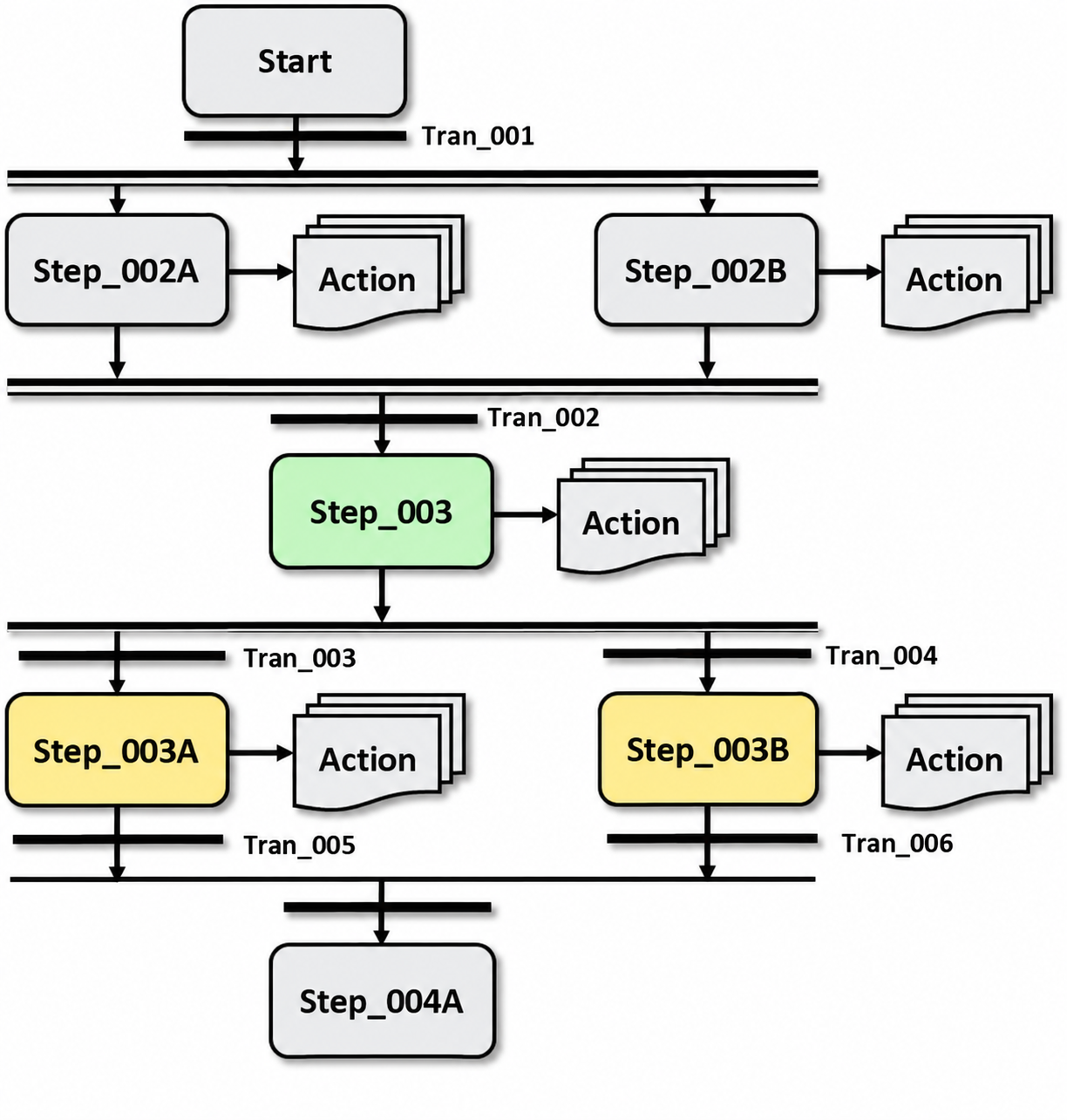
Figure 24 – Sequence-Based Control
Sequence-based control systems execute predetermined steps in a specific order to achieve a desired outcome. Unlike continuous control loops that constantly adjust outputs based on feedback, sequence-based control follows a programmed series of discrete actions or states.
Definition: Each step in the sequence typically has entry conditions (what must be true to start the step), actions (what happens during the step), and exit conditions (what must occur to move to the next step).
Industrial Example: A bottle filling line might follow this sequence: 1) Detect bottle presence, 2) Position bottle under fill nozzle, 3) Open valve for predetermined time, 4) Close valve, 5) Move bottle to capping station. Each step must complete successfully before the next begins.
This control method is commonly implemented using PLCs (Programmable Logic Controllers) with ladder logic or function block programming. The sequence can include parallel branches, conditional logic, and error handling routines to manage abnormal conditions.
Note: Sequence-based control is particularly effective for batch processes, material handling systems, and any application where operations must occur in a strict order for safety or quality reasons. The main advantage is predictable, repeatable operation, while the limitation is reduced flexibility compared to more adaptive control strategies.
5.4.2 Example of Sequence-Based Control
See Figure 25 below for an example of Sequence-Based Control (a control strategy where operations follow a predetermined order of steps, with each step completed before moving to the next).
Note: This type of control is commonly used in batch processes, startup/shutdown procedures, and safety interlocks where the timing and order of operations is critical for safe and effective system operation.
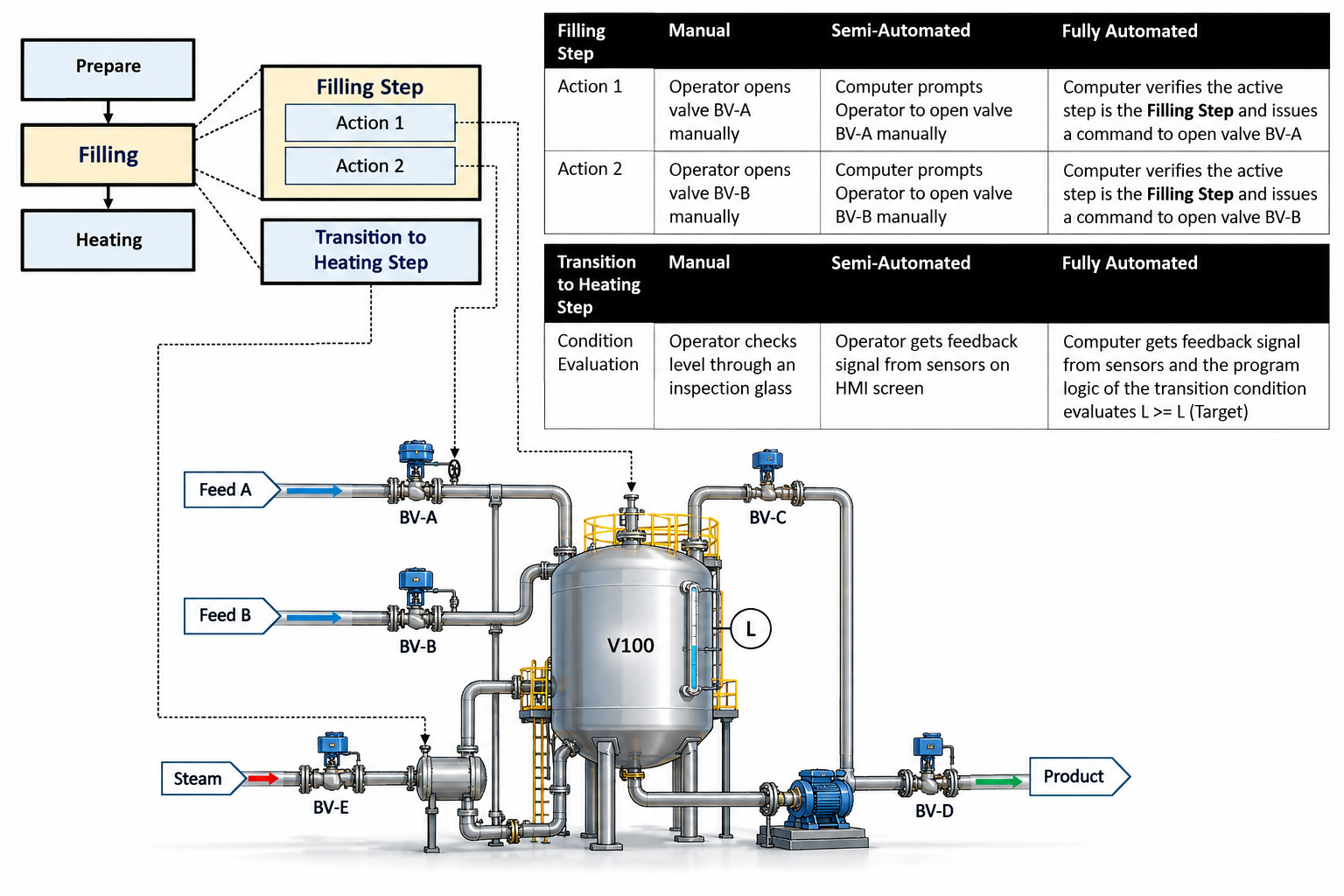
Figure 25 – Example of Sequence-Based Control
This figure demonstrates sequence-based control, which is a control strategy where operations are executed in a predetermined order based on specific conditions or events. Unlike continuous control systems that constantly adjust outputs, sequence-based control moves through discrete steps or states.
Definition: Sequence-based control executes a series of predefined actions in a specific order, with each step typically waiting for confirmation (such as a sensor signal or timer completion) before proceeding to the next step.
Industrial Example: A batch mixing process where the system first opens valve A to add ingredient 1, waits for a level sensor to confirm the correct amount, then opens valve B for ingredient 2, followed by starting the mixer motor for a preset time.
Note: This control method is commonly implemented using programmable logic controllers (PLCs) with ladder logic or sequential function charts (SFCs), making it ideal for automated manufacturing processes that require repeatable, step-by-step operations.
The sequence typically includes built-in safety checks and fault handling to ensure the process can stop or return to a safe state if any step fails to complete properly.
A sequence for a procedure may consist of the following steps:
Note: In control systems, a procedure sequence is essentially a series of ordered operations that must be executed in a specific manner to achieve a desired outcome, similar to a recipe or flowchart for your control logic.
Definition: Each step in the sequence represents a discrete action or condition check that the control system must perform, such as starting a motor, opening a valve, or verifying that a sensor reading is within acceptable limits.
Industrial Example: Consider a typical pump startup sequence - you might first verify proper oil levels (safety check), then energize the motor starter (equipment activation), wait for the motor to reach rated speed (timing/feedback verification), and finally open the discharge valve (process completion). Each of these represents an individual step that must occur in the correct order for safe and effective operation.
The sequence structure allows control engineers to break down complex operations into manageable, repeatable steps that can be programmed into PLCs (Programmable Logic Controllers) or DCS (Distributed Control Systems) platforms.
- Prepare
- Filling
- Recirculate + Heating
- Draining
- Shut Down
In each step, a set of commands (called step actions) is sent to the subordinate implementation modules (the lower-level control modules that execute the actual field operations).
Note: Think of this as a hierarchical structure where your supervisory controller sends specific instructions down to individual device controllers, similar to how a plant operator might send setpoint changes to multiple loop controllers simultaneously.
- Prepare: close all valves, stop the pump
- Filling: open input valves
- Recirculate + Heating: open re-circulate valve, start the pump, start the timer
- Draining: open output valve, start the pump
- Shut Down: close all valves, stop the pump
Between each step, the step transitions evaluate feedback from either human operators or field sensors (such as limit switches, pressure transmitters, or temperature sensors). When the step transition condition logically evaluates to “TRUE” (meaning the programmed condition has been satisfied), the sequence automatically advances to the next step in the control logic.
Note: This evaluation happens continuously during each step, ensuring the system only progresses when safe and appropriate conditions are met.
A Sequence Based control application (a programmed series of automated steps that execute in order) can be triggered either by specific process conditions or by operator actions. When the application needs to start automatically based on process conditions, you should define those triggering conditions within the PREPARE step (the initial step that sets up the sequence before execution begins).
Note: It’s perfectly acceptable for a step to contain no actions at all. For example, a NOT READY step might simply wait for certain conditions to be met without performing any control actions - it serves as a holding state until the system is ready to proceed to the next step in the sequence.
The following requirements apply to Sequence-based control implementation (a control method that executes predetermined steps in a specific order, commonly used for batch processes or equipment startup/shutdown sequences):
Definition: Sequence-based control differs from continuous PID control by following discrete steps rather than maintaining steady-state values.
5.4.3 Requirement
- The Procedure Owner shall ensure that there is a step transition “incoming” condition as well as a step transition “outgoing” condition for each step.
5.4.4 Requirement
- The Procedure Owner shall ensure that the step transition condition always contains the AND step (From) at the end of its condition or accomplish via the built-in functionality of the SFC.
Industrial Example: In a reactor heating sequence, Step 1 might be “Start agitator” with entry condition “reactor pressure < 5 psig” and exit condition “agitator speed feedback > 95% setpoint.”
Error handling and exception management must be incorporated into each step. When a step fails to complete within its expected timeframe or encounters an abnormal condition, the system should have predefined responses such as alarming operators, attempting recovery actions, or safely shutting down the process.
5.4.5 Requirement
- When using Alternate Branches, if multiple transitions become true at the same time, the Procedure Owner shall ensure that the transitions are prioritized automatically.
5.5 Finite-State Machine (FSM)
5.5.1 Description of Finite State Machine
A Finite-State Machine (FSM) is a specific implementation method for State-Based Control systems.
Definition: An FSM is a mathematical model that can exist in exactly one of a finite number of states at any given time, with defined transitions between those states based on inputs or conditions. The main differences between FSMs and general state-based control are:
Note: While all finite-state machines use state-based control principles, not all state-based control systems are implemented as finite-state machines. FSMs provide a more structured, rule-based approach that’s particularly useful for sequential control applications like batch processes, safety interlocks, and equipment startup/shutdown sequences.
Industrial Example: A pump control system might use general state-based control with continuous feedback, while a conveyor system’s start/stop/fault sequence would typically use a finite-state machine with discrete, well-defined operational states.
- Steps are called State
- Step Transition is called State Transition
A Finite-State Machine (FSM) consists of a finite number of states, where each state represents a specific operating condition or mode of the system. Based on the current state and a given input signal or condition, the machine performs state transitions (changes from one state to another) and executes the selected actions or outputs corresponding to that state.
Industrial Example: In a batch reactor control system, states might include “Idle,” “Filling,” “Heating,” “Reacting,” and “Draining.” When the system is in “Filling” state and receives a “tank full” input signal, it transitions to “Heating” state and begins executing heating control actions.
Note: FSMs are particularly useful in process control because they provide a clear, predictable way to manage complex sequential operations while ensuring the system can only be in one defined state at any given time.
A Finite-State Machine (FSM) is a computational model that represents a system as a collection of distinct operational states, where the system can only occupy one state at any given moment. The system performs different functions by transitioning between these predefined states according to specific trigger conditions or events.
Definition: Think of states as different operating modes
- each state defines what the system is currently doing and what actions it can perform.
FSMs are particularly useful in control applications where state transitions occur automatically based on input conditions, timers, or other predetermined criteria. The system follows a logical sequence without requiring manual intervention between state changes.
Industrial Examples: Common applications include washing machine cycle control (wash → rinse → spin), automotive engine start sequences (off → accessory → ignition → running), and ATM transaction flows (idle → card inserted → PIN verification → transaction menu).
Note: In control systems, FSMs help organize complex sequential operations into manageable, predictable stages, making troubleshooting and system modifications more straightforward.
A Finite-State Machine (FSM) is built from two fundamental components: states and state transitions. A state represents the current condition or mode of your system based on what inputs it has previously received, and this state determines how the system will respond to new inputs. Definition: Think of a state as the system’s “memory” of its current operational mode.
Every FSM requires one state to be designated as the initial state - this is simply the starting point where the machine begins operation when powered up or reset. State transitions are the rules that define exactly which input signals will cause the system to move from its current state to a different state.
Industrial Example: In a motor control system, an “OFF” state might transition to “STARTING” when it receives a start command input.
The output behavior of an FSM depends on its specific type - some FSM implementations generate outputs based on the current state (Moore machines), while others produce outputs during the transition between states (Mealy machines), or sometimes both states and transitions can generate outputs.
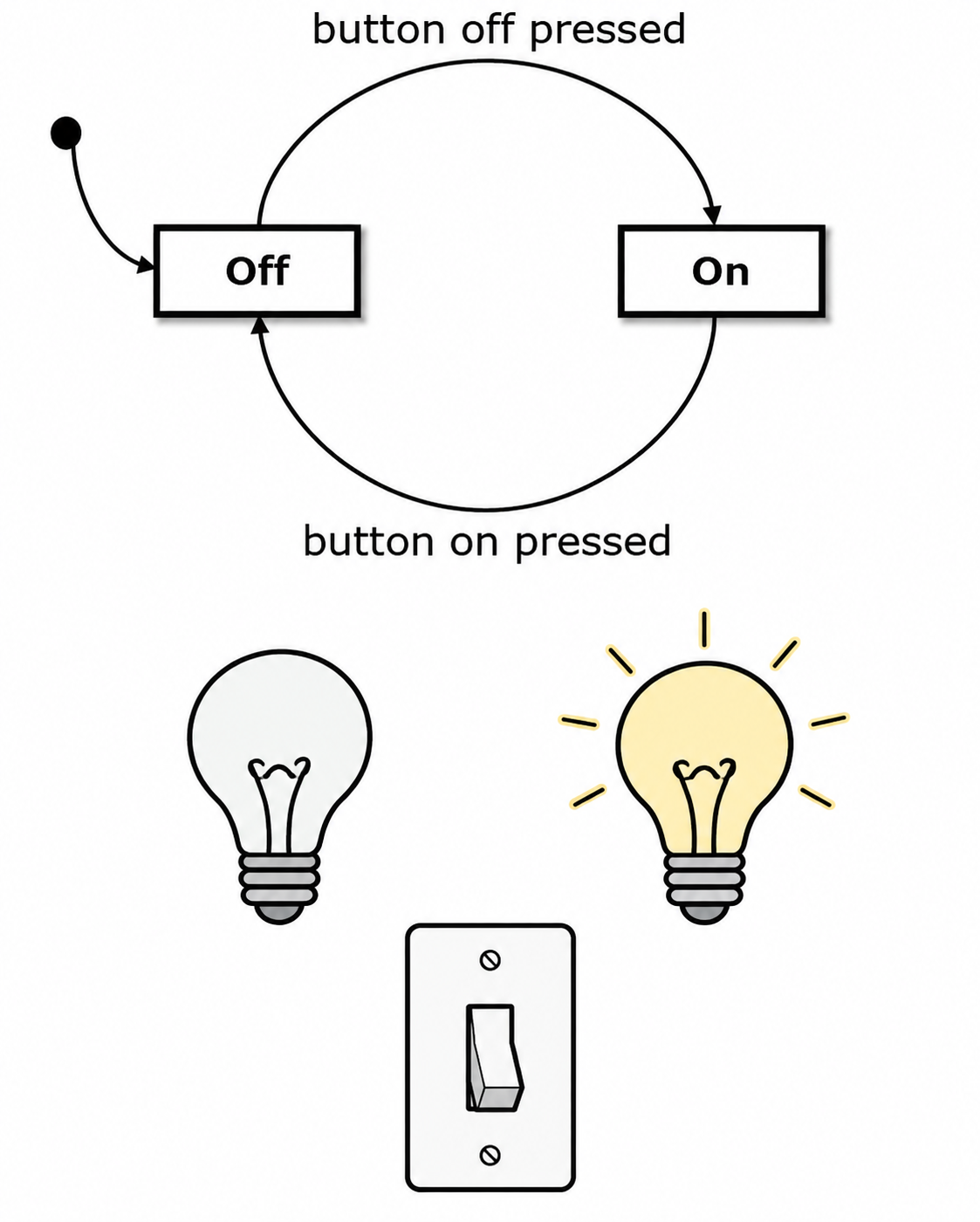
Figure 26 shows a basic state machine implementation, which is a fundamental control structure that defines how a system transitions between different operating modes or conditions. State machines are particularly useful in industrial automation because they provide a clear, logical way to manage complex sequential operations.
Definition: A state machine consists of a finite number of states (operating conditions), transitions (rules for moving between states), and events or conditions that trigger these transitions.
Industrial Example: In a conveyor system, states might include “Stopped,” “Running Forward,” “Running Reverse,” and “Emergency Stop,” with transitions triggered by operator commands, sensor inputs, or fault conditions.
Note: This simple state machine serves as a building block for more complex control logic. Each state typically corresponds to specific output actions, while transition conditions are evaluated continuously during program execution. Understanding state machines is essential for developing reliable, maintainable control systems that operators can easily troubleshoot and modify.
Consider the simple state-machine in Figure 26 above. It consists of two states, Off and On. On is the initial state here; it gets activated automatically when the state machine starts executing. The arrows between the states represent the possible state transitions (the valid paths for changing from one state to another). These arrows define which specific input will trigger a state change. In this case, the active state changes from On to Off when the input “button pressed” occurs, and switches back to On when the same “button pressed” input occurs again.
Note: This creates a toggle behavior where the same input alternately switches between the two states, similar to how a physical push-button might turn a motor on and off with each press.
The switch example above can be extended into a light switch with different brightness levels. The light switch has two buttons: an ON button and an OFF button. Pressing the ON button switches the light on and cycles through the different brightness levels (essentially acting as a multi-position selector). This behavior is modeled by the state machine shown in Figure 27 below.
Note: Each button press generates a discrete input signal that triggers a corresponding event (ON_pressed or OFF_pressed). The state machine processes these input events and responds with a state transition along with the appropriate output signals. The state machine’s output is the brightness level command, which would typically interface with a dimming circuit or PWM controller (Pulse Width Modulation - a method to control power by rapidly switching the supply on and off).
Note: This type of finite state machine is commonly used in industrial HMI (Human Machine Interface) applications where operators need to cycle through different operating modes or setpoints using simple pushbutton inputs.
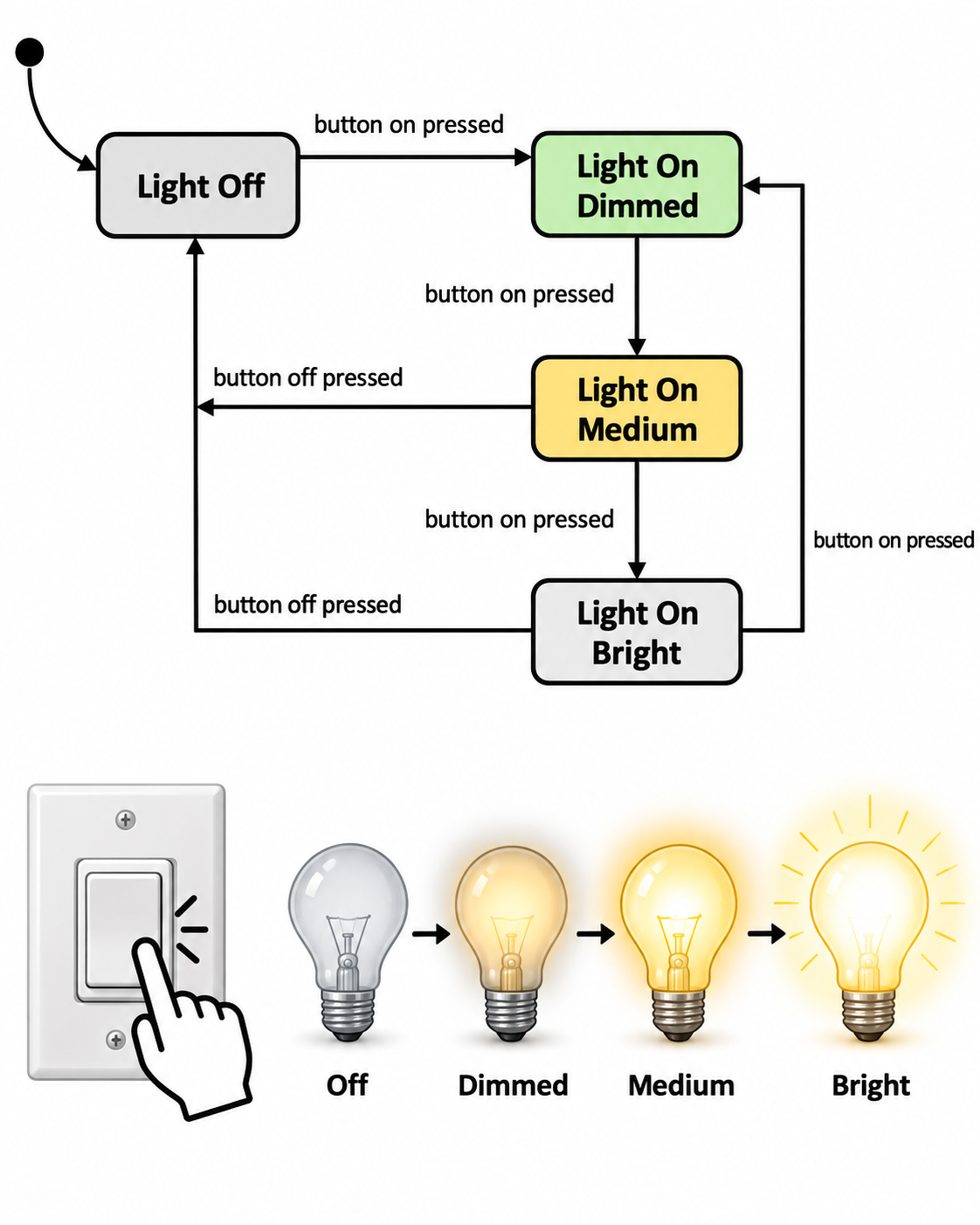
Figure 27 – Example Simple State Machine
This figure demonstrates a basic state machine implementation, which is a fundamental control logic structure used throughout industrial automation. A state machine organizes system behavior into distinct operating states, with defined transitions between them based on specific conditions or events.
Key Components: Each state represents a specific operating condition of the system, while the arrows indicate possible transitions triggered by input conditions, timers, or operator commands. The state machine executes only one state at a time, making system behavior predictable and easier to troubleshoot.
Industrial Example: In a conveyor system, states might include “Stopped,” “Running Forward,” “Running Reverse,” and “Emergency Stop,” with transitions based on operator pushbuttons, safety interlocks, or sensor feedback.
Note: State machines are commonly implemented in PLCs using ladder logic, structured text, or dedicated function blocks, and they form the backbone of sequential control applications like batch processes, material handling systems, and machine operation cycles.
5.5.2 Example of Finite-State Machine
For an air compressor, a Finite-State Machine (FSM - a control logic method that defines specific operating states and the conditions for transitioning between them) may be depicted as in Figure 28 below.
Note: In industrial applications like air compressors, FSMs help manage different operational modes such as startup, normal operation, fault conditions, and shutdown sequences, making the control logic more predictable and easier to troubleshoot.
In Figure 28, the transitions from the various operational states to the Failed state are not completely shown to keep the diagram clear and readable.
Note: In state diagrams for control systems, showing every possible failure transition from each state can make the diagram cluttered and harder to follow, so these transitions are often omitted or grouped together while still being understood to exist in the actual system logic.
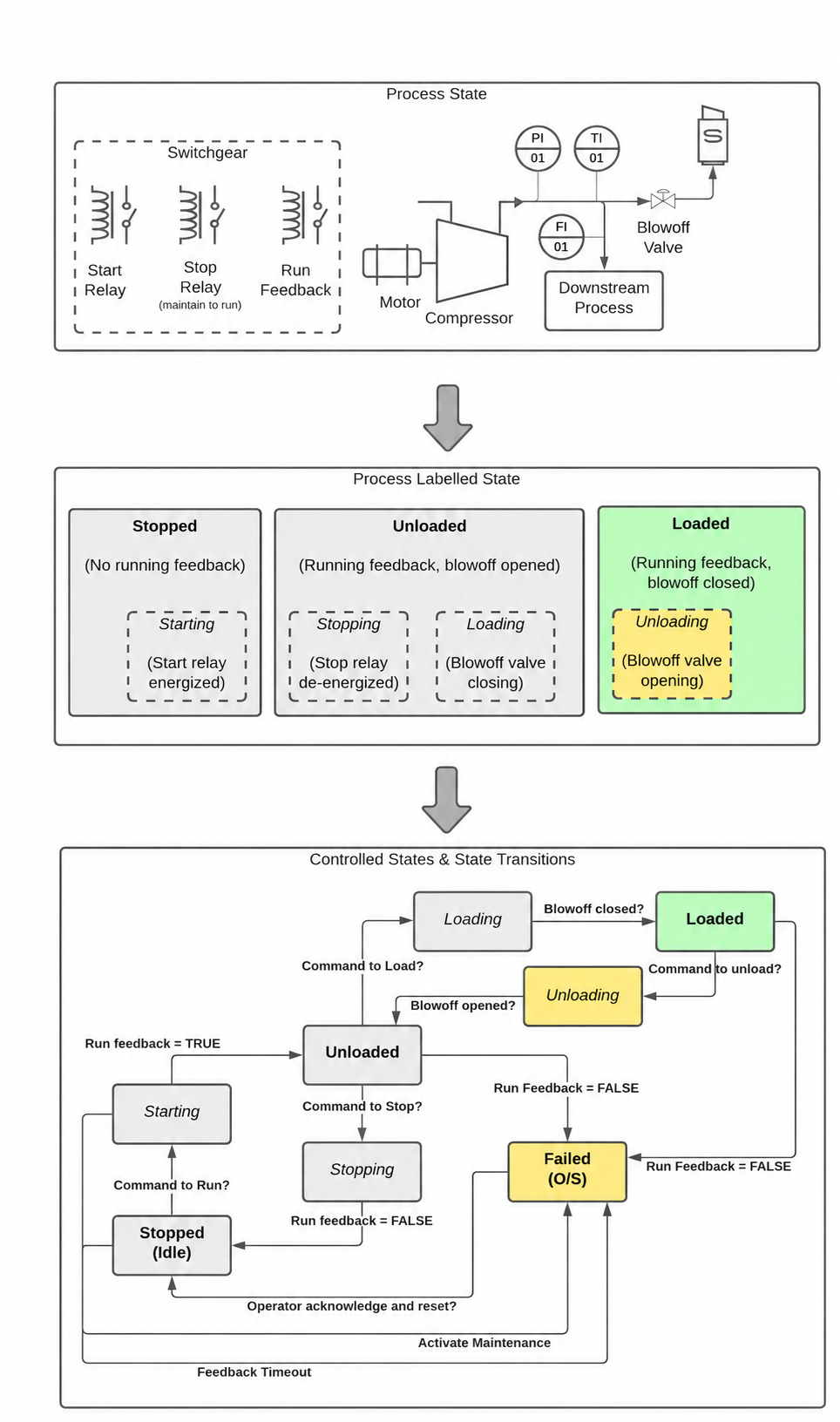
Figure 28 finite-state machine (FSM)
shows a implementation for an air compressor control system. An FSM is a mathematical model that represents a system’s behavior through distinct states and the conditions that trigger transitions between those states.
In this air compressor example, the system operates in clearly defined states such as “Off,” “Starting,” “Running,” and “Fault.” Each state represents a specific operating condition of the compressor, and transitions between states occur based on input conditions like pressure setpoints, safety interlocks, or operator commands.
Control Engineering Application: FSMs are particularly useful for sequential control applications where the system must follow a predetermined sequence of operations. They provide a structured approach to handle complex logic while maintaining predictable behavior.
Note: The state diagram format helps visualize the complete system behavior, making it easier to identify potential issues during commissioning and troubleshooting. Each arrow in the diagram represents a transition condition (such as “pressure < low setpoint” or “emergency stop pressed”), while each box represents a stable operating state where specific outputs are active.
This approach is commonly implemented in PLCs (Programmable Logic Controllers) using structured text or ladder logic, where each state can have associated actions like energizing motor contactors, opening valves, or updating status displays.
In the above example, the state consists of all the information about the process or the devices states. The state includes the state of three relays:
Note: In control systems, “state” refers to the complete set of variables that fully describe the current condition of your system at any given moment. Think of it as a snapshot that captures everything you need to know about your process - whether valves are open or closed, what temperatures sensors are reading, or in this case, whether relays are energized or de-energized. Having a complete understanding of the system state is crucial for making proper control decisions and ensuring safe operation.
- the start relay,
- the stop relay (maintain energized to run), and
- the feedback relay as well as the position of the blowoff valve.
The step also includes critical process variables such as the temperature, pressure, and flow rate of the process air. These measurements are typically obtained from field instrumentation (temperature sensors, pressure transmitters, and flow meters) and serve as feedback signals for closed-loop control systems.
Note: These process variables are essential for maintaining optimal operating conditions and ensuring the control system can make necessary adjustments to meet setpoint targets.
To implement a Finite-State Machine program, you first need to identify all possible States (distinct operating conditions or modes that the system can be in). In this particular example, the process variables temperature, pressure, and flow rate are not used to determine which State the system is in, but depending on your specific application, these or other process variables might be critical for State determination. For this example, the following States are defined:
Note: Each State represents a unique operating condition where the system behaves predictably and consistently until a transition condition is met.
- Stopped (Idle): State where the compressor is not running
- Starting
- Unloaded: State where the compressor is running with an opened blowoff (or recirculation) valve
- Loading
- Stopping
- Loaded: State where the compressor is running with a closed blowoff valve.
- Unloading
- Failed: in this case, running feedback was unexpectedly lost, so it is required that the operator investigate and acknowledge that the compressor is ready to return to service.
Note: The bolded state shown represents the stable state (where the system naturally settles and remains during normal operation), while the italicized control states are transitory states (temporary conditions the system passes through during transitions between stable operating points).
The Finite-State Machine program (or SFC - Sequential Function Chart, a graphical programming language used in PLCs) should execute specific control actions to achieve the desired process changes.
Industrial Example: In the STARTING state, the motor start relay gets energized to begin equipment operation, while during the LOADING state, the blowoff valve should gradually ramp closed to build system pressure. Although not illustrated in Figure 28 for clarity purposes, these transient states (temporary states between stable operating conditions) must also include failure transitions as a safety measure. These failure paths activate when the expected transition to the target stable state doesn’t occur within the programmed timeout period or when monitored feedback signals indicate an abnormal condition.
Note: Without proper failure transitions, the system could get stuck in a transient state indefinitely, potentially causing equipment damage or unsafe operating conditions.
A Finite-State Machine (FSM) can be implemented using Sequential Function Chart (SFC) programming, as demonstrated in Figure 29 below.
Definition: An FSM is a control logic model that transitions between defined states based on input conditions, while SFC is a graphical programming language (part of IEC 61131-3 standard) that uses steps, transitions, and actions to represent sequential control processes.
Note: This approach is particularly useful in industrial automation where you need to control processes that move through distinct operational phases, such as batch manufacturing or machine startup sequences.
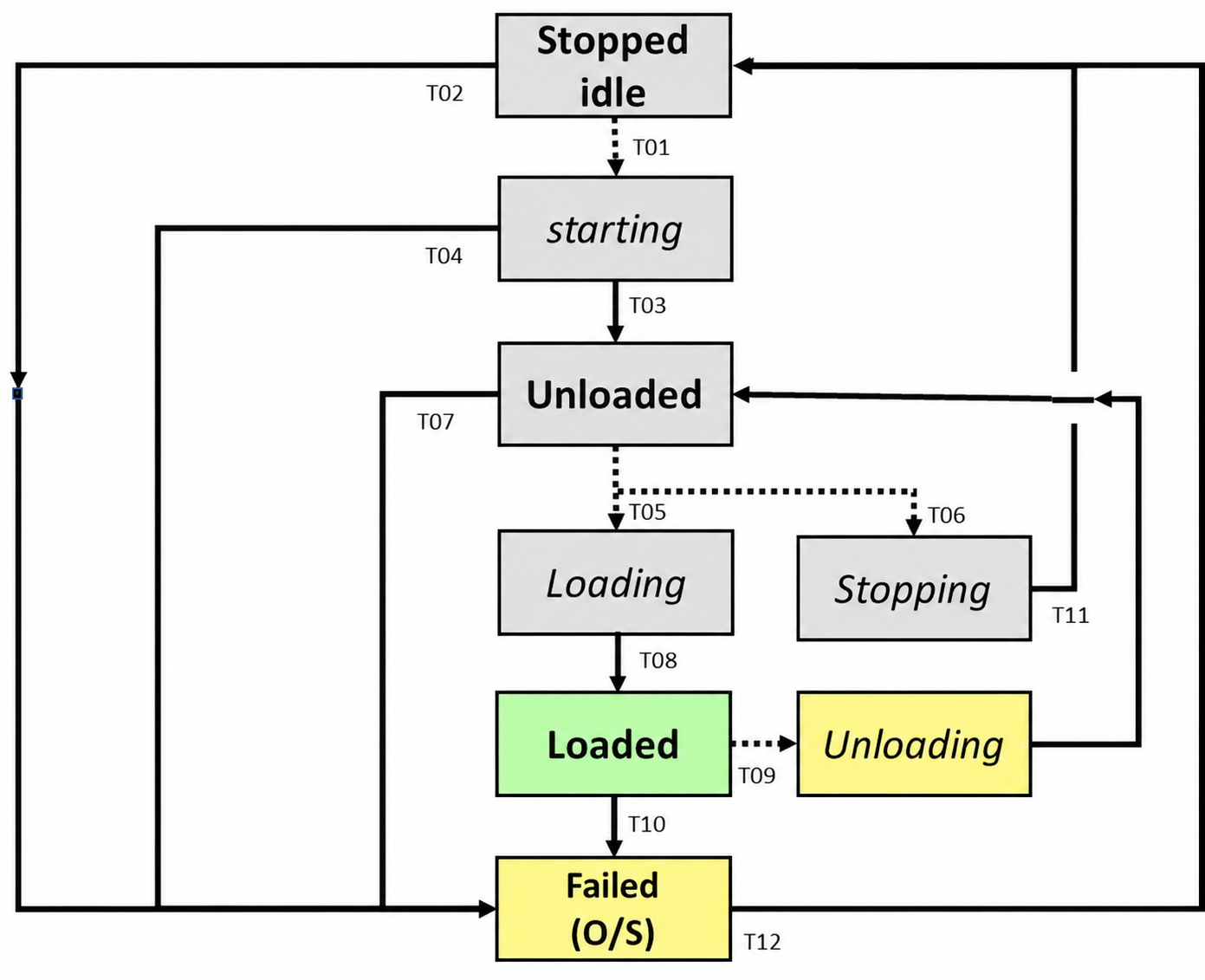
Figure 29 – Finite-State Machine Utilizing SFC (Sequential Function Chart)
Definition: A Sequential Function Chart is a graphical programming language used in PLCs that shows the sequence of steps and transitions in an automated process, making it easier to visualize and troubleshoot complex control logic.
Note: This finite-state machine implementation uses SFC structure where each step represents a distinct operating state, and transitions define the conditions required to move between states. This approach is particularly useful for batch processes or equipment that operates in clearly defined modes.
Industrial Example: Common applications include packaging machines that cycle through filling, sealing, and ejecting states, or batch reactors that progress through heating, mixing, and cooling phases based on process conditions like temperature, pressure, or timer values.
5.6 Monolithic vs Distributed Implementation
One aspect of automation style is the degree to which the procedure logic is distributed among implementation modules (the software blocks or functions that execute control strategies). At one extreme, the procedure logic is monolithic (contained in a single, large block) and exists within a single implementation module at or above the level of all the affected equipment.
Industrial Example: In a monolithic approach, all the control logic for an entire process line from raw material handling through final product packaging would be contained within one large function block or program module, rather than being split across multiple smaller, specialized modules.
Note: This centralized approach contrasts with distributed architectures where control logic is spread across multiple modules, each handling specific equipment or process steps.
A plant start-up procedure is implemented entirely at the plant module level (the highest hierarchical level in the control system architecture that encompasses all equipment units and their coordinated operation).
Industrial Example: In a chemical processing facility, the plant module would orchestrate the sequential start-up of individual units like reactors, separators, and heat exchangers, ensuring proper timing and interlocks between each subsystem rather than managing these operations at the individual equipment level.
Alternatively, the control logic may be distributed across multiple modules so that different parts of the procedure are implemented in each individual module. There are various communication mechanisms by which these modules can coordinate together to execute the overall procedure.
Note: This distributed approach is common in larger systems where you might have separate modules handling different process stages - for example, one module controlling temperature loops while another manages flow control, all working together through shared data tables or message passing.
The plant start-up procedure operates at the plant module level (the highest control layer that oversees the entire facility) but only issues high-level coordination commands to the subordinate plant unit modules below it. Each unit module then handles the specific implementation details of the start-up sequence for its particular area or equipment.
Note: This hierarchical approach separates overall plant coordination from detailed unit-specific operations, making the system more manageable and allowing unit modules to be modified independently without affecting the master start-up logic.
5.7 2-Layer vs 3-Layer Implementation
A commonly used organizational framework is the 2-layer procedure implementation, as shown in Figure 30 below. This is essentially another term for a monolithic implementation (where all control logic is contained in a single, unified system) that divides functionality into two distinct levels: the upper layer handles the procedure logic (sequential operations, batch recipes, and process coordination), while the lower layer manages device-level operations (direct I/O control, sensor readings, and actuator commands).
Note: This architecture separates high-level process sequencing from low-level hardware interface tasks, making the system easier to troubleshoot and maintain while keeping all control functions within one integrated platform.
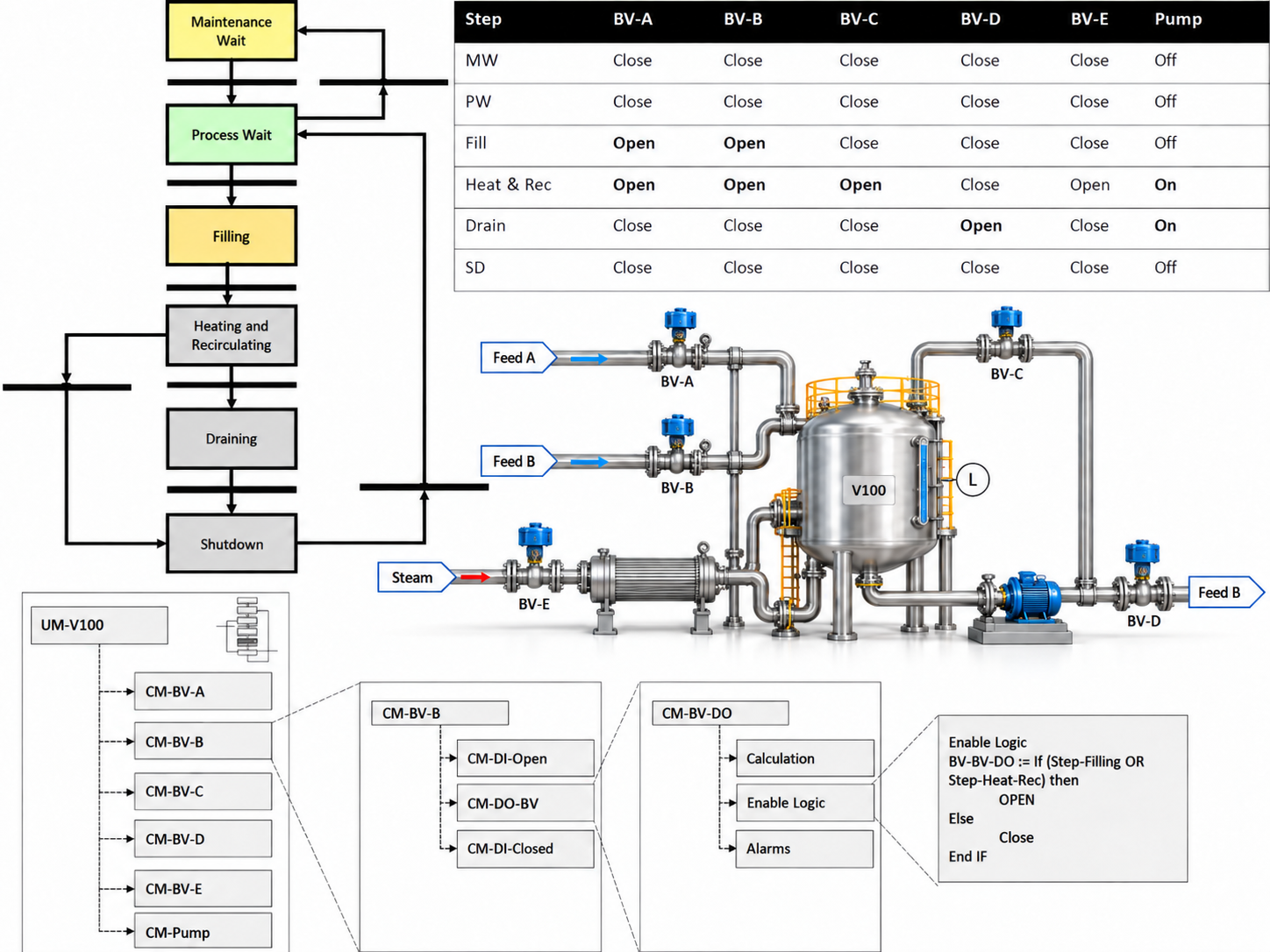
Figure 30 – Two-Layer Procedure Implementation
This diagram illustrates a two-layer control architecture where decision-making is separated into distinct hierarchical levels. The upper layer typically handles supervisory control functions (high-level decision making, setpoint optimization, and coordination between multiple control loops), while the lower layer manages the direct regulatory control (PID loops that directly manipulate actuators based on sensor feedback).
Note: This separation allows the supervisory layer to operate at slower time scales (minutes to hours) while the regulatory layer responds rapidly (milliseconds to seconds) to process disturbances. The two-layer approach is commonly used in advanced process control applications where you need both fast local control and intelligent coordination across multiple process units.
Industrial Example: In a distillation column, the lower layer would handle individual temperature and flow control loops, while the upper layer optimizes overall column performance by adjusting setpoints based on feed composition changes or product quality requirements.
Another commonly used organizational framework is the 3-layer procedure implementation, which separates control logic into distinct hierarchical levels for better organization and maintenance. See Figure 31 below. In some implementations, equipment modules may be created by adding a layer of abstraction between the procedure logic and the device (this intermediate layer acts as a translator, allowing the higher-level control procedures to communicate with physical hardware without needing to know specific device details).
Note: This abstraction layer is particularly useful when working with different manufacturers’ equipment that may have varying communication protocols or control interfaces.
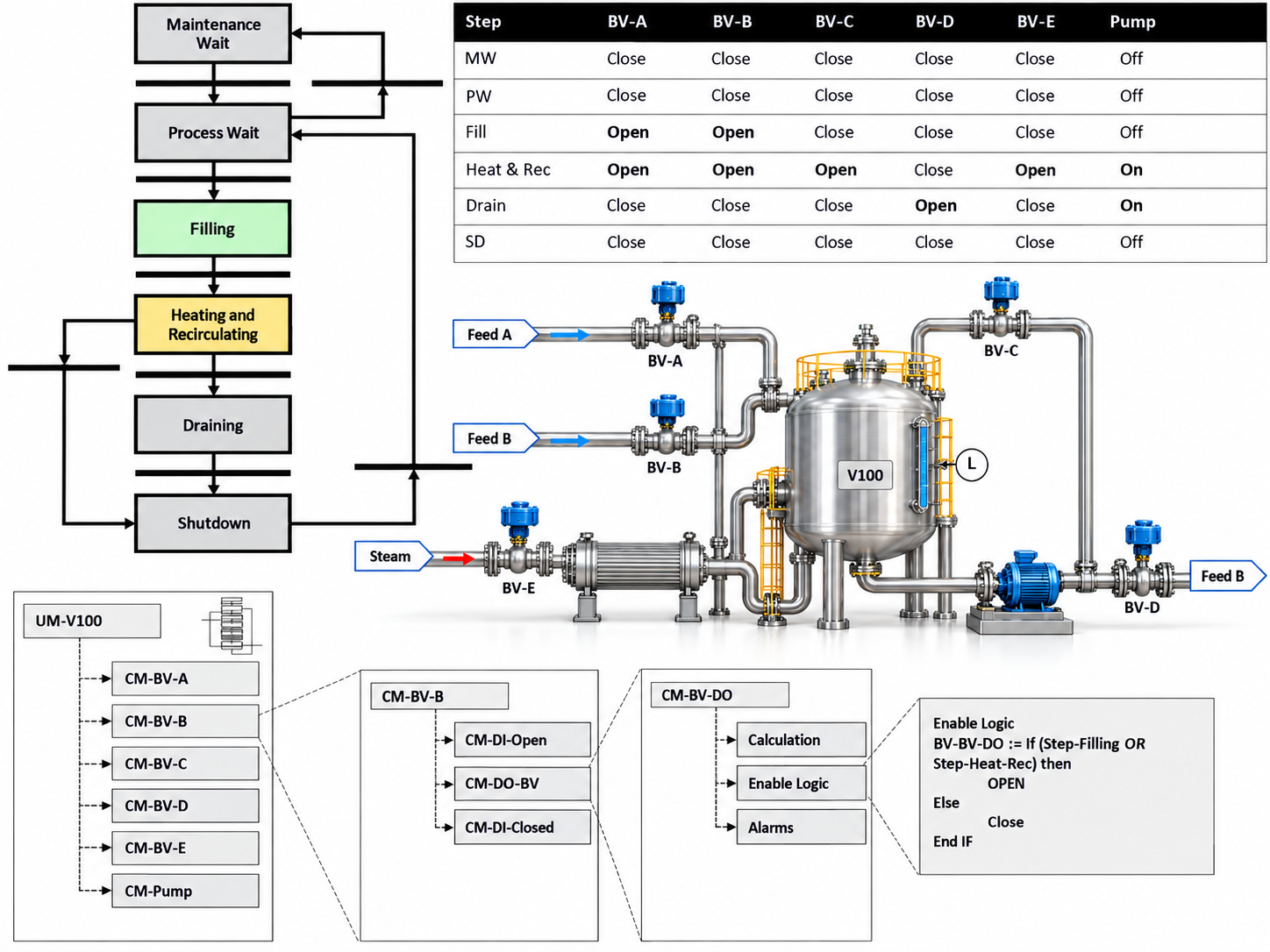
Figure 31 implementation of a three-layer control procedure
This figure illustrates the implementation of a three-layer control procedure, which is a hierarchical approach commonly used in industrial automation systems. This structure divides control responsibilities across three distinct operational levels, each handling different aspects of the overall process control strategy.
The three-layer architecture typically consists of a supervisory layer (handles high-level decision making and setpoint management), a regulatory layer (performs continuous feedback control loops like PID controllers), and a safety layer (monitors critical parameters and executes emergency shutdowns when necessary). Each layer operates at different time scales and priorities, with the safety layer having the fastest response time and highest priority.
Note: This layered approach helps organize complex control systems by separating concerns - you don’t want your emergency safety functions competing with routine process adjustments for computing resources or response time.
Industrial Example: In a chemical reactor system, the supervisory layer might adjust temperature setpoints based on production schedules, the regulatory layer maintains those temperatures using PID control, and the safety layer immediately shuts down the reactor if pressure exceeds safe limits.
The implementation shown demonstrates how information flows between layers and how each layer’s outputs influence the others while maintaining clear functional boundaries. This separation improves system reliability, makes troubleshooting easier, and allows for independent testing and validation of each control layer.
5.8 Considerations of Distributed Implementation
5.8.1 Discussion of Considerations
The best approach depends on your specific system requirements and constraints. When you distribute control logic to lower levels (such as moving PID loops or interlocking logic from the main controller to field devices or local I/O modules), you create reusable code modules that can simplify your higher-level supervisory control procedures.
Benefits of distributed logic:
- Implementation time: Reusable modules reduce programming effort for similar control loops or sequences
- Debugging: Issues can be isolated to specific subsystems rather than troubleshooting complex centralized code
- Maintenance:Technicians can work on individual control modules without affecting the entire system
Note: This modular approach is particularly useful in process control where you might have multiple similar unit operations (like several identical pumps or heat exchangers) that can use the same control logic template.
One possible disadvantage of a distributed implementation is that some granularity in the procedure may be sacrificed (meaning you might lose fine-level control or detailed step-by-step precision when control tasks are spread across multiple devices or processors).
Note: This trade-off occurs because distributed systems must coordinate between different controllers or nodes, which can make it harder to achieve the same level of detailed, precise control timing that you’d get with a single centralized controller handling all operations.
A pump module can be designed to automatically execute all startup procedures when it receives a start command - this includes opening the inlet valve, energizing the motor, and closing the recycle valve to establish system pressure. While this approach simplifies the main control sequence by packaging all pump logic into a single callable function, it creates a trade-off in operational flexibility. The main sequence loses the ability to specify different startup profiles, such as commanding a rapid pressure ramp for emergency situations versus a gradual ramp for normal operations.
Note: This illustrates a common design decision in modular programming - choosing between automation convenience and operational control granularity.
The way information is displayed to the operator is a critical design consideration. In distributed control systems (where control functions are spread across multiple processors or locations), implementing clear “Mode of Operation” indicators helps operators understand the current system state and maintain proper situational awareness.
Definition: Mode of Operation refers to the current operational state of the system, such as Manual, Automatic, Startup, Shutdown, or Maintenance mode.
Note: In distributed implementations, different subsystems may be operating in different modes simultaneously, making clear mode indication essential for safe operation and troubleshooting.
Another consideration is selecting the hardware and software platforms that will run your control logic. If your design requires dedicated external software (such as a supervisory control application or MES system) to handle the high-level procedural logic, while the individual device control functions run on separate DCS or PLC systems, you may face integration challenges. The communication interfaces between these higher-level modules and lower-level control modules often can’t be standardized across different platforms, which defeats the primary advantage of using modular design.
Note: This platform mismatch is common when trying to integrate legacy systems with newer supervisory software, often requiring custom communication protocols or middleware solutions.
The distribution of logic has important implications when choosing between a state-based versus sequence-based approach for procedure implementation.
Definition: State-based approaches use discrete states (like “Ready,” “Running,” “Fault”) with transitions between them, while sequence-based approaches follow a predetermined order of steps or actions.
Note: Logic distribution refers to how control decisions and processing are spread across different system components - whether centralized in one controller or distributed among multiple devices like PLCs, HMIs, and field devices.
Industrial Example: In a state-based system, a pump might exist in “Standby,” “Starting,” or “Running” states with specific conditions triggering transitions. A sequence-based system would instead follow steps like - 1. Check prerequisites, - 2. Open inlet valve, - 3. Start motor, - 4. Confirm flow.
The choice between these approaches significantly affects how you’ll need to coordinate logic across your distributed control architecture, impacting factors like communication requirements, fault handling, and system maintainability.
5.8.2 Robustness and Exception Handling
When working with a monolithic implementation (a single, large control program that handles all system functions), it can be challenging to handle exceptions in a fully automated manner. A monolithic approach typically can only represent the expected combination of states across all sub-modules (individual control components like pumps, valves, or drives within the larger system). Any deviations from these pre-programmed state combinations may have to be represented using catch-all exception states, which are usually left to the operator to manually diagnose and correct.
Note: This limitation occurs because monolithic systems have difficulty isolating which specific sub-module caused the exception, making automated recovery more complex to implement safely.
In a monolithic sequence (a single, large control program block), it’s much easier to implement catch-all exception handling rather than trying to handle every possible fault condition individually.
Definition: Monolithic sequences are control programs written as one continuous block of logic, as opposed to modular programming where functions are separated into smaller, reusable components.
Note: While catch-all exception handling simplifies programming, it can make troubleshooting more difficult since specific fault conditions aren’t individually identified. Consider whether your application requires detailed fault diagnostics before choosing this approach.
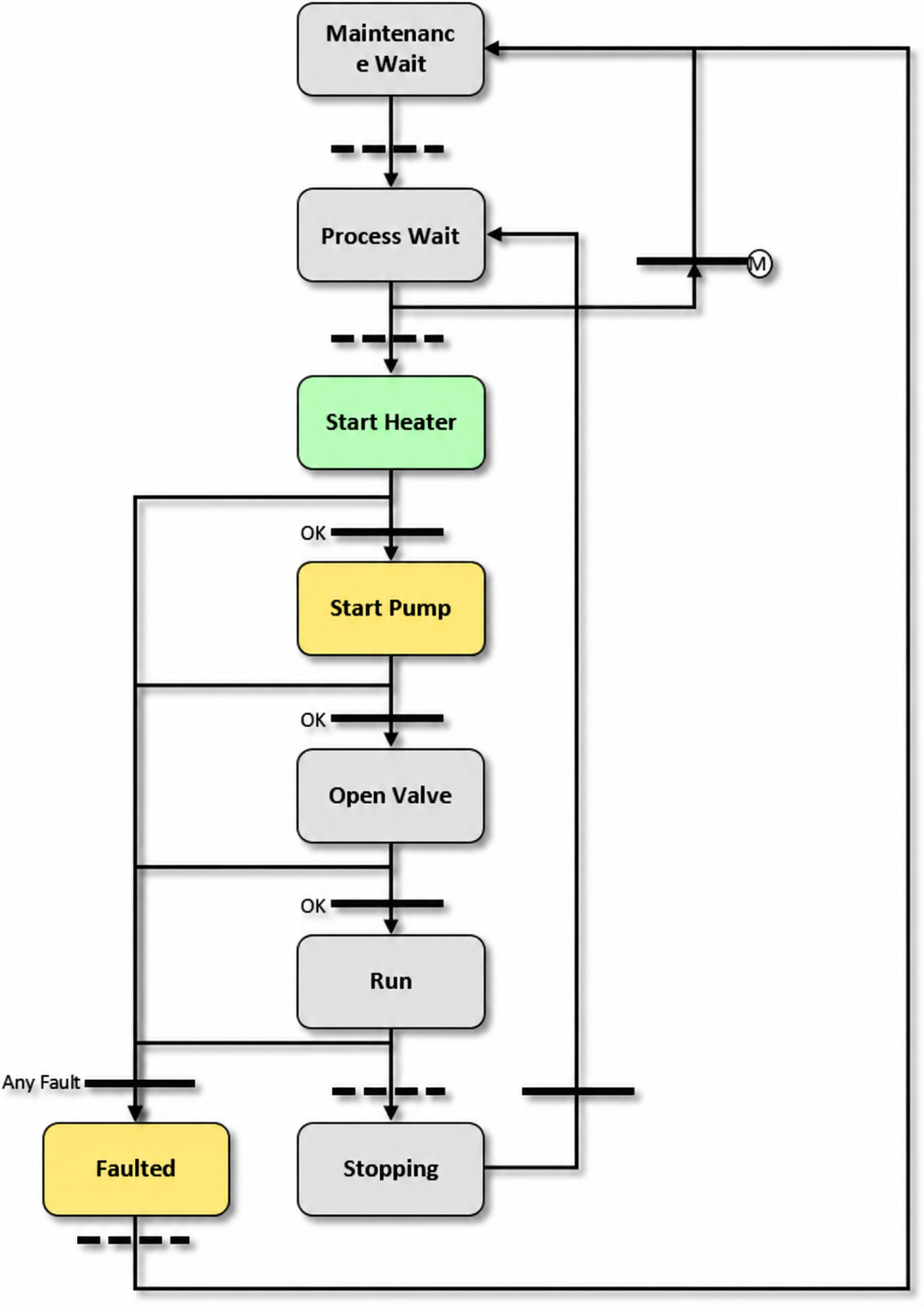
Figure 32 exception handling
This figure shows how exception handling works in a monolithic implementation using a catch-all approach. In this architecture, all system components are integrated into a single control program rather than distributed across multiple modules.
Definition: A monolithic implementation means the entire control system runs as one unified program, making it easier to manage but potentially less flexible than modular designs.
The catch-all approach provides a safety net by capturing any unexpected errors or faults that weren’t specifically anticipated in the individual exception handlers. This method ensures that even unforeseen system failures won’t cause the entire control system to crash unexpectedly.
Note: While catch-all handling improves system robustness, it’s important to log these exceptions properly so you can identify and address the root causes during maintenance cycles.
This implementation style is commonly used in smaller control systems where the overhead of distributed error handling isn’t justified, and where having centralized fault management simplifies troubleshooting and system diagnostics.
In a distributed implementation, each piece of equipment logic may be designed to resolve its own failures without having to consider the states of unrelated equipment. This approach allows individual controllers (such as PLCs or DCS modules) to handle their local fault conditions independently, reducing system complexity and improving response times. See Figure 33.
Industrial Example: A pump controller can detect its own motor overload condition and initiate shutdown procedures without needing to check the status of nearby valves or other pumps in the system.
Note: This distributed fault handling strategy contrasts with centralized approaches where a master controller must evaluate all equipment states before making decisions, which can create bottlenecks and single points of failure.
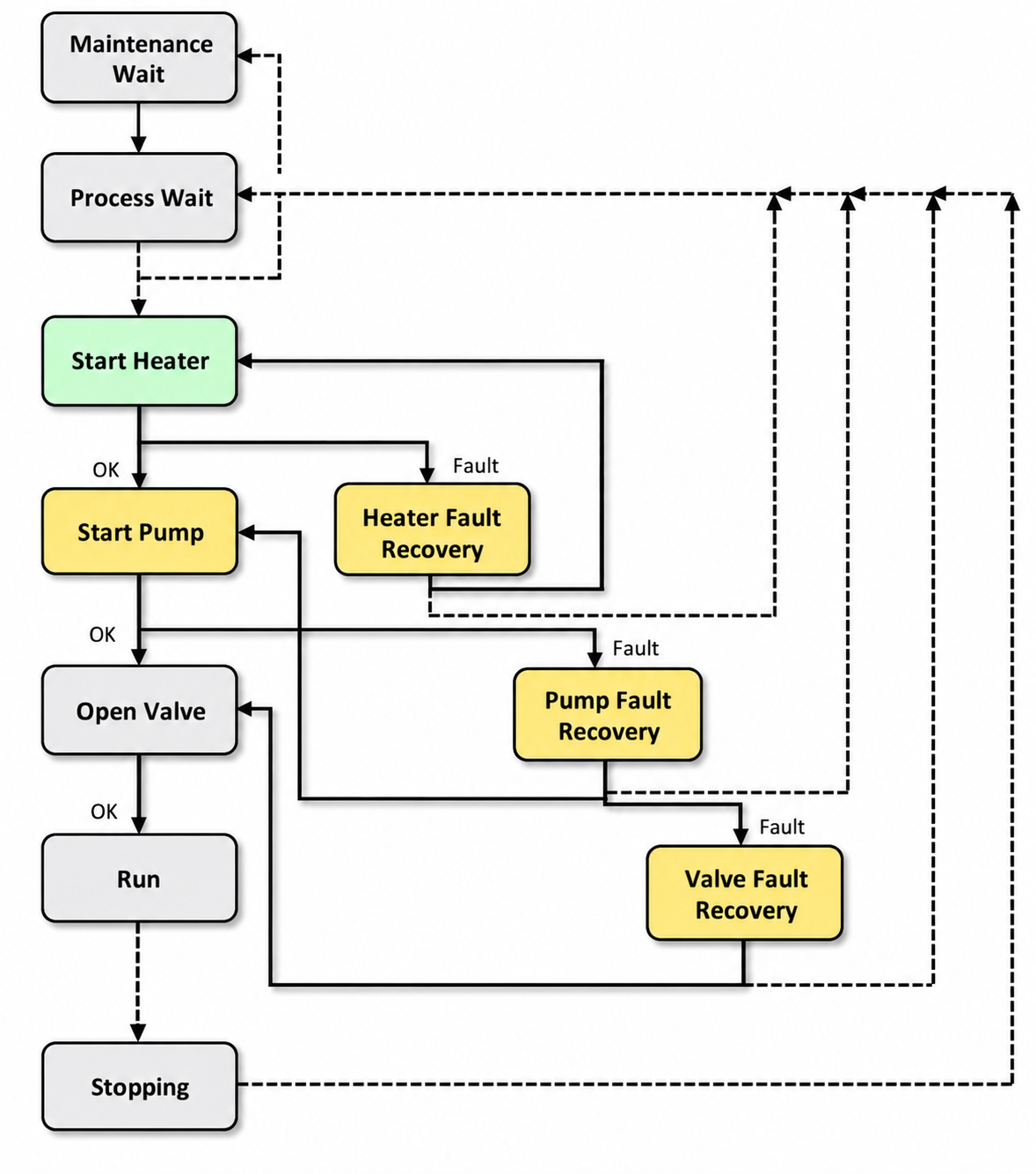
Figure 33 – Monolithic Implementation
This figure illustrates a common pitfall in control system design where engineers attempt to build a single, large control block that accounts for every conceivable fault condition or operational scenario. In a monolithic approach (meaning one large, unified structure), the control logic becomes increasingly complex as more exception handling is added to address edge cases, sensor failures, actuator malfunctions, and process disturbances.
Problem with this approach: The resulting control structure becomes difficult to debug, modify, or maintain. When a fault occurs, it’s challenging to isolate which part of the monolithic block is causing issues. Additionally, the extensive exception handling can create unexpected interactions between different fault conditions.
Definition: Exception handling in control systems refers to the logic designed to manage abnormal operating conditions, such as sensor drift, communication timeouts, or equipment failures.
Better alternative: Consider using a modular approach where different control functions and their associated exception handling are separated into distinct blocks. This makes the system more maintainable and allows for easier testing of individual components. Each module can handle its own specific exceptions while communicating status information to a supervisory control layer.
5.9 Comparison of the Styles of Automation
Automation styles help create standardized approaches for automated procedures, which benefits operators through consistent interfaces and reduces engineering costs by enabling reuse of existing procedure logic across different systems. When implementing automated procedures, careful consideration must be given to the human-machine interface (HMI) design to ensure operators can effectively monitor system status and maintain situational awareness of the process state.
Key Design Consideration: The way information is presented to operators is critical - displays should provide clear indication of procedure status, active steps, and any conditions requiring operator attention or intervention.
Note: Reusing procedure logic not only cuts development time but also improves reliability since proven code blocks reduce the risk of introducing new programming errors.
Reference Table 9 for how specific automation principles align with each of the three automation styles discussed.
Table 9 outlines the fundamental principles that guide different control system design approaches. Each control style represents a distinct philosophy for how control loops should be structured and tuned to achieve desired system performance.
Classical Control Principles: Based on frequency domain analysis using tools like Bode plots and root locus methods. These approaches focus on system stability margins (how close the system is to becoming unstable) and steady-state error minimization. PID controllers are the most common implementation of classical control principles.
Modern Control Principles: Utilize state-space representation (mathematical models that describe system behavior using state variables) and optimization techniques. These methods can handle multi-input, multi-output (MIMO) systems more effectively than classical approaches. Linear Quadratic Regulator (LQR) and Model Predictive Control (MPC) are typical modern control implementations.
Robust Control Principles: Designed to maintain acceptable performance despite model uncertainties and external disturbances. These approaches explicitly account for variations in plant parameters (the physical system being controlled) and unmeasured disturbances that can affect system behavior.
Adaptive Control Principles: Feature controllers that can modify their parameters in real-time based on changing system conditions. The control algorithm continuously updates its internal model of the plant to maintain optimal performance as operating conditions shift.
Note: The choice between these principles depends on factors such as system complexity, performance requirements, computational resources available in your control hardware, and the level of uncertainty in your process model.
| Principle | Description | SBC | SqBC | FSM | Comment |
|---|---|---|---|---|---|
| 1 | Operational situational awareness is integral to the solution | H | H | N | |
| 2 | Mental models are integral to the solution | H | M | N | |
| 3 | Applying Automation Procedure to EM= |
M | H | N | |
| 4 | Applying more modular Automation Procedure to UM =< EM =< CM or UM =< CM with some operator awareness Push: Use Step Actions EM-SFC >> (EM Step) >> (CM State) Pull: Use Enable Logic EM-SFC (CM Enable Logic Pull Steps) | H | M | N | Use of so-called Intelligent EM objects |
| 5 | Blackbox – Limited awareness or interaction except start by event | L | L | H | |
| 6 | Multiple parallel steps within an implementation procedure may be able to be active at the same time | N | H | N | Only SqBC |
| 7 | Module to Module interactions coordinated | H | M | N |
In the table referenced above, the following notation and symbols are used:
Note: Understanding this notation is crucial for interpreting control system specifications and performance metrics correctly. Each symbol represents a specific parameter or variable that directly impacts system behavior and design decisions.
Quick Reference: When reviewing control documentation, these symbols will appear frequently in transfer functions, stability analyses, and performance calculations. Keep this notation guide handy during system design and troubleshooting activities.
- H: High
- M: Medium
- L: Low
- N: Not Recommended
Some of the approaches that different automation styles address include:
Note: Automation styles refer to the various methodologies and architectural approaches used to design and implement control systems. Each style has its own way of handling common automation challenges such as system integration, data management, operator interaction, and maintenance requirements.
These approaches typically focus on how to structure control logic, organize system components, manage communication between devices, and present information to operators. The choice of automation style often depends on factors like plant complexity, safety requirements, maintenance capabilities, and long-term operational goals.
Industrial Example: A simple relay-based control system (traditional style) handles approaches differently than a modern DCS (distributed control system) or a cloud-connected IoT automation platform, even when controlling the same process.
- Organization of the implementation module structure
- Reusability and modularity of the logic with regard to the equipment
- Use of computer or operator action for commands
- Amount of precision used for verification
- Human-machine interface philosophy
- Degree of automation from minimal automation to fully automated
- Robustness of the automation and degree to which exception handling is automated
A single project or facility (whether it’s an entire enterprise, site, or individual plant) often combines multiple automation approaches, since each style works best for specific areas of the plant or under particular process conditions. For example, a chemical plant might use distributed control systems (DCS) for continuous processes like distillation while implementing programmable logic controllers (PLCs) for discrete operations like material handling.
Note: This mixed approach also applies within a single implementation module - different control tasks within the same module may require different automation styles based on their specific requirements.
Industrial Example: In a water treatment facility, you might see SCADA systems monitoring overall plant performance, PLCs controlling individual pump stations, and specialized process controllers managing chemical dosing systems, all working together as part of one integrated project.
The value of automated procedures lies in eliminating manual operator intervention across multiple system components. Rather than requiring an operator to individually adjust each valve position, modify controller setpoints, and activate motors to achieve the desired process state, the automated procedure executes a single command sequence. This sequence performs all predefined tasks (valve positioning, setpoint changes, motor starts/stops) and includes built-in verification steps to confirm each action completed successfully before proceeding to the next step.
Note: This verification capability is critical for process safety and helps prevent cascading failures that could occur if downstream actions execute based on incomplete upstream tasks.
The automation style most appropriate to meet a procedure specification depends upon many factors, including safety, risk, cost, and benefit.
When selecting an automation approach for a specific process, control engineers must evaluate several critical factors. Safety considerations include both personnel protection and equipment safeguarding, often driving the need for fail-safe designs and redundant control systems. Risk assessment involves analyzing potential failure modes and their consequences on production continuity and asset integrity.
Note: The procedure specification defines the detailed requirements for how a process should operate, including setpoints, control sequences, and safety interlocks.
Cost factors encompass not only initial capital expenditure for hardware and software but also ongoing maintenance costs, operator training requirements, and system lifecycle expenses. Benefits typically include improved process consistency, reduced operating costs, enhanced product quality, and increased throughput capacity.
Industrial Example: A simple temperature control loop might use basic PID control (proportional-integral-derivative control algorithm), while a critical safety system for a reactor might require a dedicated Safety Instrumented System (SIS) with redundant sensors and logic solvers.
The optimal automation style emerges from balancing these competing factors against the specific operational requirements and constraints of each application.
The implementation method you choose for a control system can significantly impact which automation approach works best for your procedure. Different implementation methods (such as PLC ladder logic, function block diagrams, or structured text programming) each have strengths that align better with certain automation styles.
Example: A simple on/off control procedure might work well with basic ladder logic implementation, while a complex multi-loop temperature control system might benefit from function block programming that supports advanced PID algorithms and cascade control structures.
Note: Consider your plant’s existing systems, maintenance team capabilities, and the complexity of the control logic when selecting both your implementation method and automation style to ensure they complement each other effectively.